Tuesday, November 30, 2010

Sammy.JS

I’ve been looking at Sammy.JS recently. It’s a lightweight Javascript framework for managing transitions on your page. It extends jQuery. The neat trick it uses is to leverage the anchor part of the URI – that’s the bit after the ‘#’ to provide routes into your javascript. If you’ve used the new routing framework in ASP.NET you’ll understand it straight away.

Here’s a quick example I’ve put together. We’ve got three links with three paragraphs. As you click the links the related paragraph appears.

This is the first paragraph.

This is the second paragraph.

This is the third paragraph.

The big deal is that I now have a URI to each paragraph and normal browser functions like the back button work. Go on, you can try it. I can correctly link straight to a particular state of my Ajax application, and you know what a PITA that can be.

Here’s the code for the page:

<html>
<head>
<title>Sammy Test</title>
<script src="http://ajax.microsoft.com/ajax/jQuery/jquery-1.4.2.min.js" type="text/javascript"></script>
<script src="sammy.js" type="text/javascript"></script>
<script src="sammy_test.js" type="text/javascript"></script>
</head>
<body>
<div id="header">
<h1>Sammy Test</h1>
<a href="#/one">one</a>
<a href="#/two">two</a>
<a href="#/three">three</a>
</div>
<div id="main">
<p id="one">This is the first paragraph.</p>
<p id="two">This is the second paragraph.</p>
<p id="three">This is the third paragraph.</p>
</div>
</body>
</html>

And here’s the script:

(function($) {

var app = $.sammy('#main', function() {

var hideAll = function() {
$("#one").hide();
$("#two").hide();
$("#three").hide();
};

this.get('#/', function(context) {
hideAll();
});

this.get("#/one", function(context) {
hideAll();
$("#one").show();
});

this.get("#/two", function(context) {
hideAll();
$("#two").show();
});

this.get("#/three", function(context) {
hideAll();
$("#three").show();
});
});

$(function() {
app.run('#/');
});

})(jQuery);

If you are writing even a slightly complicated Ajax application it’s worth checking Sammy out.

Saturday, November 20, 2010

Pedant Corner: Clarifying IoC, DIP and DI

There were quite a few comments on my last post telling me that I was confusing the following terms:

  • Inversion of Control
  • Dependency Inversion (Principle)
  • Dependency Injection

So I thought I’d attempt to clarify things. Check out this Wikipedia article:

http://en.wikipedia.org/wiki/Inversion_of_control

"Inversion of Control is highly associated with dependency injection and the dependency inversion principle. Dependency injection is the main method to implement Inversion of Control."

As I understand it Inversion of Control and the Dependency Inversion Principle are both different names for the same 'principle' of OO design. That you should decouple your software by depending on abstractions rather than implementations.

Dependency Injection is a 'pattern' used to implement Inversion of Control/Dependency Inversion. This is either implemented as constructor injection, where dependencies are ‘injected’ via constructor parameters, or as property injection where dependencies are injected via property setters.

This is just my understanding of these terms. If you think I’m wrong please comment and maybe we can arrive at some accepted definitions.

Thursday, November 18, 2010

The first Commandment: Thou shalt not reference the IoC container!

I recently received a very nice email asking about one of my ‘10 Advanced Windsor Tricks’ posts where I’d stated, without really backing it up:

“Without this trick you would have to reference the container itself, which is an IoC anti-pattern of epic proportions.”

So why is referencing the IoC container an anti-pattern?

The hint is the name 'Inversion of Control'. IoC a is core principle of OO design, the idea being that you don't depend on concrete implementations, but on abstractions (in our case, interfaces). We want to build our software like Lego, out of independent components, that supply to their environment all the information about what they need to work. That information is described in interfaces. When we have a service like this:

public class MyService : ISomeService
{
    public MyService(ISomeDependecy someDependency) {
    }
}

… it's telling us two things, firstly that it supplies a service described by the ISomeService interface, that is, anywhere where an ISomeService is required, MyService can be supplied. The second thing it tells us is that it requires ISomeDependency to work. It doesn't care how that's implemented, just that whatever is supplied obeys that contract.

The important point here is that MyService is described entirely in terms of it’s own domain. Inversion of Control is a principle not a technology. We don’t need a container at this stage.

Now if I'm referencing a container I've lost that information:

public class MyService: ISomeService
{
    public MyService() {
        var someDependency = StaticContainer.Resolve<ISomeDependency>();
    }
}

You might argue that the container is what it needs to in order to function, but we're really lying here, we could be using any dependency internally and it's not communicated to the outside world. Rather than describing our component in terms of its own domain, we’re polluting it with infrastructure concerns (the container).

By doing this you are making your life harder than it needs to be. Say I want to write a unit test for MyService, I now have to mock IContainer and get it to pass some mock of ISomeDependency, it's twice as much work. So not only have I lost information, I've made my own life as a developer harder.

But the most important message that this kind of code is carrying, is that the author has failed to grasp the real genius of IoC containers. I’ll try an example:

Say I have these components:

class Component1 : IComponent1
{
    Component1(IComponent2 component2) { ... }
}

class Component2 : IComponent2
{
    Component2(IComponent3 component3) { ... }
}

class Component3 : IComponent3

They are all registered with my IoC container. Now when I resolve IComponent1 like this:

var component1 = container.Resolve<IComponent1>();

the container will first create an instance of Component3, then an instance of Component2 passing it the Component3 instance in its constructor. Then finally it will create an instance of Component3 passing the Component2 instance to its constructor which it returns to the caller.

Deep inside our infrastructure, there is a single call to the container to get the root object of our application (our core application class if you will), all the cascading dependencies from that root object are discovered, constructed and supplied by the container. That's the magic of IoC containers, they glue our application together, but you never see them except for that initial, single resolve call.

So referencing the container itself is an anti-pattern of epic proportions, because it means you’ve failed to understand what an IoC container is. It's a bit like buying a tractor, hitching it up to a team of horses and attempting to plow a field with it.

Monday, November 08, 2010

Tardis Bank at £5App

Here’s a video of me presenting Tardis Bank at £5App last week. It was late in the evening and we’d all had a few beers, so it’s worth watching just for the heckling :) Many thanks to Ian Ozsvald for sharing this. The whole evening was excellent, it’s well worth checking out the other videos on Ian’s blog.

£5 App #23 - Mike and the Tardis Bank from Ian Ozsvald on Vimeo.

Friday, November 05, 2010

An ASP.NET HttpModule to set the current culture to the user’s locale

Update: sandord, in the comments, has pointed out that you can achieve the same result with a simple configuration setting in Web.config:

<globalization culture="auto" uiculture="auto" enableClientBasedCulture="”true”" />

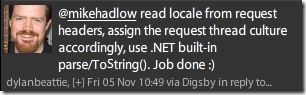
My web application TardisBank (a pocket money bank account for kids) needs to show users the currency symbol for their location. So UK users should see ‘£’, but US users should see ‘$’. I’d thought that I would have to ask the user to choose a currency symbol when they signed up, but Dylan Beattie had a much better idea:

dylan_twitter_recommends_locale_from_request

A quick Google turned up this excellent article by Rick Strahl, ‘detecting and setting the current locale on the current asp.net web request’.

Using Rick’s code I quickly created an ASP.NET module:

using System;
using System.Globalization;
using System.Threading;
using System.Web;

namespace Suteki.TardisBank.Mvc
{
    public class UserLocaleModule : IHttpModule
    {
        public void Init(HttpApplication httpApplication)
        {
            httpApplication.BeginRequest += (sender, eventArgs) =>
            {
                var app = sender as HttpApplication;
                if (app == null)
                {
                    throw new ApplicationException("Sender is null or not an HttpApplication");
                }
                var request = app.Context.Request;
                if (request.UserLanguages == null || request.UserLanguages.Length == 0) return;

                var language = request.UserLanguages[0];
                if (language == null) return;

                try
                {
                    Thread.CurrentThread.CurrentCulture = new CultureInfo(language);
                }
                catch
                {}
            };
        }

        public void Dispose()
        {
            
        }
    }
}

Which I configured in TardisBank’s web.config:

<modules runAllManagedModulesForAllRequests="true">
  <add name="UserLocale" type="Suteki.TardisBank.Mvc.UserLocaleModule, Suteki.TardisBank" />
</modules>

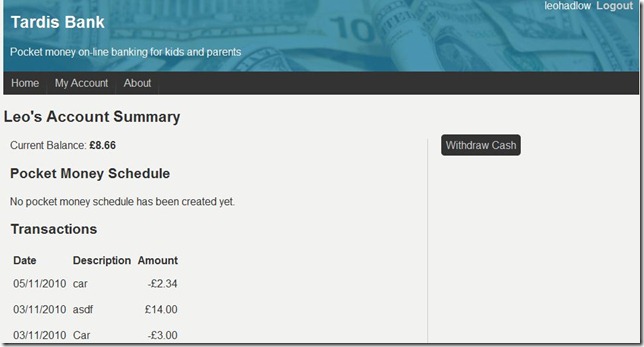
And now I’ve got currency symbols :)

tardisbank_currency_gbp

And if I change my browser’s language settings:

tardisbank_change_language_settings

I now get the $ symbol instead:

tardisbank_currency_usd

Thanks Dylan & Rick! It’s a very neat solution.

Composing Sequential Tasks With Linq

This is a continuation of my Task Parallel Library investigations. Yesterday I wrote about using TPL with MVC.

Say we have a number of asynchronous tasks that we want to execute in series because the result of the first task is an input value to the second task, and the result of the second task is an input to the third. To demonstrate, I’ve created two simple task generators:

static Task<int> CreateInt(int a)
{
    return Task<int>.Factory.StartNew(() =>
    {
        Console.WriteLine("Starting CreateInt   {0}", a);
        Thread.Sleep(1000);
        Console.WriteLine("Completing CreateInt {0}", a);
        return a;
    });
}

static Task<int> AddInts(int a, int b)
{
    return Task<int>.Factory.StartNew(() =>
    {
        Console.WriteLine("Starting AddInts     {0} + {1}", a, b);
        Thread.Sleep(1000);
        Console.WriteLine("Completing AddInts   {0} + {1}", a, b);
        return a + b;
    });
}

I want to create an int and then add 3 to it, and then add 4. It’s difficult to compose these using the standard ‘ContinueWith’ callback:

public void ComposeWithContinueWith()
{
    var result = CreateInt(2)
        .ContinueWith(t1 => AddInts(t1.Result, 3)
            .ContinueWith(t2 => AddInts(t2.Result, 4))
            );

    // result is the first task, how do you get the third task's result?
}

You can simply put two lots of ‘Unwrap()’ at the end of the expression:

public void ComposeWithContinueWith() { var result = CreateInt(2) .ContinueWith(t1 => AddInts(t1.Result, 3) .ContinueWith(t2 => AddInts(t2.Result, 4)) ).Unwrap().Unwrap();

Console.WriteLine("Completed with result {0}", result.Result); }

But there is a much nicer way. But because tasks are Monadic, you can compose them using Linq:

Update / Correction: The out-of-the-box Task<T> doesn’t have Linq methods (SelectMany etc) built in.

However, there is an implementation in the ParallelExtensionsExtras assembly. I confused myself (it happens a lot) because I’d included the ParallelExtensionsExtras for the Task extension methods on SmtpClient and SqlDataReader, and has simply assumed that Task<T> has the Linq extension methods built in.

You can build the ParallelExtensionsExtras.dll yourself from the Samples for Parallel Programming. Alternatively, you can just grab a compiled ParallelExtensionsExtras.dll from my sample solution at: https://github.com/mikehadlow/Suteki.AsyncMvcTpl. Stephen Toub has a great write up on the goodies in the Parallel Extensions Extras library here, it’s a great read.

Anyway, so once you have a reference to ParallelExtensionsExtras, you can compose Tasks using Linq expressions:

public void CanComposeTasksWithLinq()
{
    var result = from a in CreateInt(2)
                 from b in AddInts(a, 3)
                 from c in AddInts(b, 4)
                 select c;

    Console.WriteLine("Completed with result {0}", result.Result);
}

Which outputs:

Starting CreateInt   2
Completing CreateInt 2
Starting AddInts     2 + 3
Completing AddInts   2 + 3
Starting AddInts     5 + 4
Completing AddInts   5 + 4
Completed with result 9

This is a really nice pattern to use if you have a number of async IO tasks to do in series.

Thursday, November 04, 2010

Tardis Bank is now live

Tardis bank is a little web application I’ve put together. It provides an on-line pocket money bank account for parents and children. I originally wrote it for my Son and I to use, but anyone can sign up. So if you know anyone with kids between 5 and 15, ask them to give it a go.

Actually it went live on Monday, but I completely forgot to mention it here. You can find it at http://tardisbank.com. The code is on GitHub here: https://github.com/mikehadlow/Suteki.TardisBank. It’s a nice little sample of how to use MVC3, Windsor and RavenDb together.

tardisbank_frontpage

I had a great time presenting it at £5App here in Brighton on Tuesday night. The crowd there had some really good ideas about how I could improve it, as well as pointing out one particular bug :) To date, 42 parents and children have signed up to use it.

Using the Task Parallel Library with ASP.NET MVC for scalable web applications

Get the full sample solution from  GitHub: https://github.com/mikehadlow/Suteki.AsyncMvcTpl

Most applications spend most of their time doing IO operations. Communicating with a database or web service over the network or reading and writing files can take orders of magnitude longer than running instructions on the CPU. Web applications are no different, but have a additional complexity in that they are multi-threaded by nature, each request being served on a new thread. IIS only maintains a certain sized threadpool for handing requests and once all the threads are consumed, requests start to queue. You can mitigate this by doing asynchronous IO.

Using the new Task Parallel Library in .NET 4.0 makes building asynchronous controller actions much easier, and this post will show you how.

Here’s a common scenario. I have a controller action that makes a couple of calls to a service class:

[HttpGet]
public ViewResult Index()
{
    var user = userService.GetCurrentUser();
    userService.SendUserAMessage(user, "Hi From the MVC TPL experiment");
    return View(user);
}

The two methods I call on my UserService in turn make calls on two further classes:

public User GetCurrentUser()
{
    const int currentUserId = 10;
    return userRepository.GetUserById(currentUserId);
}

public void SendUserAMessage(User user, string message)
{
    emailService.SendEmail(user.Email, message);
}

Yes, this is an entirely contrived and simplified example, but the essentials are in place.

The UserRepository in turn uses ADO.NET to make a call to SQL Server to retrieve a row from the database:

public class UserRepository
{
    public User GetUserById(int currentUserId)
    {
        using (var connection = new SqlConnection("Data Source=localhost;Initial Catalog=AsncMvcTpl;Integrated Security=SSPI;"))
        {
            connection.Open();
            using (var command = connection.CreateCommand())
            {
                command.CommandText = "select * from [user] where Id = 10";
                command.CommandType = CommandType.Text;

                using (var reader = command.ExecuteReader())
                {
                    if (reader.HasRows)
                    {
                        reader.Read();
                        return new User((int)reader["Id"], (string)reader["Name"], (string)reader["Email"]);
                    }
                    throw new ApplicationException("No row with Id = 10 in user table");
                }
            }
        }
    }
}

The EmailService sends an email using the Standard System.Net.Mail.SmtpClient:

public void SendEmail(string emailAddress, string message)
{
    var mailMessage = new MailMessage("info@suteki.co.uk", emailAddress)
    {
        Subject = "Hello!",
        Body = "An important message from Nigeria :)"
    };

    var smtpClient = new SmtpClient("smtp.suteki.co.uk");
    smtpClient.Send(mailMessage);
}

Now, both the call to the database and the email dispatch are IO intensive. Most of the time, the IIS thread that the action executes on will be idle, waiting for first the database and then the email call to return. Even though the thread is mostly idle, it is still not available to process other requests. At some reasonable load, the requests will start to queue and eventually IIS will give up entirely and issue a 503 ‘server busy’ error.

However, both the SqlDataReader.ExecuteReader and the SmtpClient.Send methods have asynchronous versions. Under the bonnet these use operating system IO completion ports which means that the thread handling the request can be returned to the IIS threadpool while the IO operation completes.

The trick is to make sure that the entire stack from the action method down to the BCL call (the BeginExecuteReader and SendAsync calls) knows how to work asynchronously. Prior to the Task Parallel Library, this would have meant implementing BeginXXX and EndXXX methods at every layer (the Asynchronous Programming Model), so we would have had UserService.BeginGetCurrentUser and UserService.EndGetCurrentUser etc, and then on the UserRepository, BeginGetUserById / EndGetUserById. The code starts to look pretty formidable as well.

With the Task Parallel Library, we can represent any async operation as a Task or Task<T>. The first job is to wrap the BCL SqlDataReader and SmtpClient calls as tasks. For BCL classes that implement BeginXXX and EndXXX  methods we can just use the task factory’s FromAsync method, and that’s what we do here with the UserRepository’s GetUserById method:

public Task<User> GetUserById(int currentUserId)
{
    var connection =
        new SqlConnection("Data Source=localhost;Initial Catalog=AsncMvcTpl;Integrated Security=SSPI;Asynchronous Processing=true");
    connection.Open();
    var command = connection.CreateCommand();
    command.CommandText = "select * from [user] where Id = 10";
    command.CommandType = CommandType.Text;

    var readerTask = Task<SqlDataReader>.Factory.FromAsync(command.BeginExecuteReader, command.EndExecuteReader, null);
    return readerTask.ContinueWith(t =>
    {
        var reader = t.Result;
        try
        {
            if (reader.HasRows)
            {
                reader.Read();
                return new User((int)reader["Id"], (string)reader["Name"], (string)reader["Email"]);
            }
            throw new ApplicationException("No row with Id = 10 in user table");
        }
        finally 
        {
            reader.Dispose();
            command.Dispose();
            connection.Dispose();
        }
    });
}

Now GetUserById returns a Task<User> instead of a User. Effectively we are saying that the caller will get a user at some point in the future.

Once the reader has been wrapped in a task we can consume it with a continuation supplied to the ContinueWith method. The continuation can return a value, in our case a User, that then pops out of the ContinueWith method as the promise of a future user; a Task<User>.

SmtpClient doesn’t use APM, so turning its async operation into a task is a little more tricky, luckily this has already been done for us with the TPL team’s Parallel Extensions Extras library. I’m going to use that library’s SendTask extension method here:

public Task SendEmail(string emailAddress, string message)
{
    var mailMessage = new MailMessage("info@suteki.co.uk", emailAddress)
    {
        Subject = "Hello!",
        Body = "An important message :)"
    };

    var smtpClient = new SmtpClient("smtp.suteki.co.uk");
    return smtpClient.SendTask(mailMessage, null);
}

Because the synchronous version of this method returned void, we simply return Task here.

Now the power of the TPL really starts to work for us. We hardly have to change our UserService methods at all:

public Task<User> GetCurrentUser()
{
    const int currentUserId = 10;
    return userRepository.GetUserById(currentUserId);
}

public Task SendUserAMessage(User user, string message)
{
    return emailService.SendEmail(user.Email, message);
}

We are simply passing Task<User> and Task back up the stack, no need to implement Begin/End methods. This is very powerful.

Finally we come to the action method. This is where the code gets gnarly again. We have leave the lovely world of TPL and shoehorn it into the crappy MVC async controller:

public class HomeController : AsyncController
{
    readonly UserService userService = new UserService();

    [HttpGet]
    public void IndexAsync()
    {
        AsyncManager.OutstandingOperations.Increment();
        userService.GetCurrentUser().ContinueWith(t1 =>
        {
            var user = t1.Result;
            userService.SendUserAMessage(user, "Hi From the MVC TPL experiment").ContinueWith(t2 =>
            {
                AsyncManager.Parameters["user"] = user;
                AsyncManager.OutstandingOperations.Decrement();
            });
        });
        
    }

    public ViewResult IndexCompleted(User user)
    {
        return View(user);
    }
}

Jeff Prosise has a very nice post about the ASP.NET MVC async controller. You’d probably want to read that first. But simply put, you inherit from AsyncController and rather than calling your action ‘Index’ you split it into two and call it IndexAsync and IndexCompleted, the router understands this convention and correctly routes Home/Index to the IndexAsync action.

AsyncController has an AsyncManager that keeps track of async callbacks using its Increment/Decrement methods. When the count gets back to zero IndexCompleted is called. You can marshal state to the completed method using the AsyncManager’s Parameters dictionary as shown.

Once again we are using ContinueWith to supply continuations to grab the result of GetCurrentUser and then wait for the SendUserAMessage to complete.

Note that I haven’t considered exception handling in this example. You need to be very careful that you catch and notify exceptions that happen in async operations.

Now for my gripe. It would have been really slick if the MVC team had used TPL to implement async controller methods. I should be able to keep my single Index action but return a Task<ViewResult> instead. My async Index action would then look like this:

[HttpGet]
public Task<ViewResult> Index()
{
    return from user in userService.GetCurrentUser()
           from _ in userService.SendUserAMessage(user, "Hi From the MVC TPL experiment")
           select View(user);
}

Update: Craig Cav has implemented an async controller that does just this. You can read his post about it here. He’s branched my example and demonstrates the Task based async controller here.

Oh yes, tasks are monadic so you can compose them with Linq. No they are not, but the Linq extensions can be found in the TaksParallelExtensions library. See my post here for more info.

Should I care about this?

As with most scalability optimisations this makes your code more complex, harder to understand and harder to debug. I’ve been happily building web applications without doing this for years. You should only ever use this technique if you have an immediate scalability concern and you know that it is caused by a threadpool full of threads blocked by long running IO operations.

Having said that, if you do have these kinds of issues, then using the TPL like this makes them easier to solve than the older being/end spaghetti that you previously would have had to write.

It’s also worth noting that doing this kind of thing will become easier still with C#5’s new async operator. At that point it might we worth doing this kind of async IO as a matter of course.