Sunday, October 25, 2009

Collection covariance with C# 4.0

Download the code for this post here: http://static.mikehadlow.com/Mike.Vs2010Play.zip

I finally got around to downloading the Visual Studio 2010 beta 2.0 last weekend. One of the first things I wanted to play with was the new covariant collection types. These allow you to treat collections of a sub-type as collections of their super-type, so you can write stuff like:

IEnumerable<Cat> cats = CreateSomeCats();
IEnumerable<Animal> animals = cats;

My current client is the UK Pension’s Regulator. They have an interesting, but not uncommon, domain modelling issue. They fundamentally deal with pension schemes of which there are two distinct types: defined contribution (DC) schemes, where you contribute a negotiated amount, but the amount you get when you retire is entirely dependent on the mercy of the markets; and defined benefit (DB) schemes, where you get a negotiated amount no matter what the performance of the scheme’s investments. Needless to say, a DB scheme is the one you want :)

To model this they have an IScheme interface with implementations for the two different kinds of scheme. Obvious really.

Now, they need to know far more about the employers providing DB schemes than they do about those that offer DC schemes, so they have a IEmployer interface that defines the common stuff, and then different subclasses for DB and DC employers. The model looks something like this:

schemeModel

Often you want to treat schemes polymorphically; iterating through a collection of schemes and then iterating through their employers. With C# 3.0 this is a tricky one to model. IScheme can have a property ‘Employers’ of type IEnumerable<IEmployer>, but you have to do some ugly item-by-item casting in order to convert from the internal IEnumerable<specific-employee-type>. You can’t then use the same Employers property in the specific case when you want to do some DB only operation on DB employers, instead you have to provide another ‘DbEmployers’ property of type IEnumerable<DefinedBenefitEmployer> or have the client do more nasty item-by-item casting.

But with C# 4.0 and covariant type parameters this can be modelled very nicely. First we have a scheme interface

using System.Collections.Generic;
namespace Mike.Vs2010Play
{
    public interface IScheme<out T> where T : IEmployer
    {
        IEnumerable<T> Employers { get; }
    }
}

Note that the generic argument T is prefixed with the ‘out’ keyword. This tells the compiler that we only want to use T as an output value. The compiler will now allow us to cast from an IScheme<DefinedBenefitEmployer>to an IScheme<IEmployer>.

Let’s look at the implementation of DefinedBenefitScheme:

using System.Collections.Generic;
namespace Mike.Vs2010Play
{
    public class DefinedBenefitScheme : IScheme<DefinedBenefitEmployer>
    {
        List<DefinedBenefitEmployer> employers = new List<DefinedBenefitEmployer>();

        public IEnumerable<DefinedBenefitEmployer> Employers
        {
            get { return employers; }
        }

        public DefinedBenefitScheme WithEmployer(DefinedBenefitEmployer employer)
        {
            employers.Add(employer);
            return this;
        }
    }
}

We can see that the ‘Employers’ property can now be defined as IEnumerable<DefinedBenefitEmployer> so we get DB employers when we are dealing with a DB scheme. But when we cast it to an IScheme<IEmployer>, the Employers property is cast to IEnumerable<IEmployer>.

It’s worth noting that we can’t define ‘WithEmployer’ as ‘WithEmployer(T employer)’ on the IScheme interface. If we try doing this we’ll get a compile time error saying that ‘T is not contravariant’, or something along those lines. That’s because T in this case is an input parameter, and we have explicitly stated on IScheme that T will only be used for output. In any case it would make no sense for WithEmployer to be polymorphic; we deliberately want to limit DB schemes to DB employers.

Let’s look at an example. We’ll create both a DB and a DC scheme. First we’ll do some operation with the DB scheme that requires us to iterate over its employers and get DB employer specific information, then we’ll treat both schemes polymorphically to get the names of all employers.

public void DemonstrateCovariance()
{
    // we can create a defined benefit scheme with specialised employers
    var definedBenefitScheme = new DefinedBenefitScheme()
            .WithEmployer(new DefinedBenefitEmployer { Name = "Widgets Ltd", TotalValueOfAssets = 12345M })
            .WithEmployer(new DefinedBenefitEmployer { Name = "Gadgets Ltd", TotalValueOfAssets = 56789M });

    // we can treat the DB scheme normally outputting its specialised employers
    Console.WriteLine("Assets for DB schemes:");
    foreach (var employer in definedBenefitScheme.Employers)
    {
        Console.WriteLine("Total Value of Assets: {0}", employer.TotalValueOfAssets);
    }

    // we can create a defined contribution scheme with its specialised employers
    var definedContributionScheme = new DefinedContributionScheme()
            .WithEmployer(new DefinedContributionEmployer { Name = "Tools Ltd" })
            .WithEmployer(new DefinedContributionEmployer { Name = "Fools Ltd" });

    // with covariance we can also treat the schemes polymorphically
    var schemes = new IScheme<IEmployer>[]{
        definedBenefitScheme,
        definedContributionScheme
    };

    // we can also treat the scheme's employers polymorphically
    var employerNames = schemes.SelectMany(scheme => scheme.Employers).Select(employer => employer.Name);

    Console.WriteLine("\r\nNames of all emloyers:");
    foreach(var name in employerNames)
    {
        Console.WriteLine(name);
    }
}

When we run this, we get the following output:

Assets for DB schemes:
Total Value of Assets: 12345
Total Value of Assets: 56789

Names of all employers:
Widgets Ltd
Gadgets Ltd
Tools Ltd
Fools Ltd

It’s worth checking out co and contra variance, why it’s important and how it can help you. Eric Lippert has a great series of blog posts with all the details:

Covariance and Contravariance in C#, Part One
Covariance and Contravariance in C#, Part Two: Array Covariance
Covariance and Contravariance in C#, Part Three: Method Group Conversion Variance
Covariance and Contravariance in C#, Part Four: Real Delegate Variance
Covariance and Contravariance In C#, Part Five: Higher Order Functions Hurt My Brain
Covariance and Contravariance in C#, Part Six: Interface Variance
Covariance and Contravariance in C# Part Seven: Why Do We Need A Syntax At All?
Covariance and Contravariance in C#, Part Eight: Syntax Options
Covariance and Contravariance in C#, Part Nine: Breaking Changes
Covariance and Contravariance in C#, Part Ten: Dealing With Ambiguity
Covariance and Contravariance, Part Eleven: To infinity, but not beyond

Wednesday, October 14, 2009

TFS Build: _PublishedWebsites for exe and dll projects. Part 2

By default Team Build spews all compilation output into a single directory. Although web projects are output in deployable form into a directory called _PublishedWebsites\<name of project> the same is not true for exe or dll projects. A while back I wrote a post showing how you could grab the output for exe projects and place them in a similar _PublishedApplications directory, and this worked fine for simple cases.

However that solution relied on getting the correct files from the single flat compile output directory. Now, we have exe projects that output various helper files, such as XSLT documents, in subdirectories. So we may end up with paths like this: MyProject\bin\Release\Transforms\ImportantTransform.xslt. But because these subdirectories get flattened by the default TFS build we loose our output directory structure.

This begs the question: why do we need to output everything in this big flat directory anyway? Why can’t we just have our CI build do the same as our Visual Studio build and simply output the build products into the <project name>\bin\Release folders? Then we can simply copy the compilation output to our build output directory.

There’s an easy way to do this with TFS introduced with 2008; simply change the property CustomizableOutDir to true and the TFS build will behave just like a Visual Studio build. Put the following in your TFSBuild.proj file somewhere near the top under the Project element:


<PropertyGroup>
  <CustomizableOutDir>true</CustomizableOutDir>
</PropertyGroup>

Aaron Hallberg has a great blog post explaining exactly how this all works. Aaron’s blog is essential reading if you’re doing pretty much anything with TFS. You can still get the directory where TFS would have put the output from the new TeamBuildOutDir property.

Now the TFS build outputs into bin/Release in exactly the same way as a standard Visual Studio build and we can just grab the outputs for the projects we need and copy them to our build output directory. I do this by including a CI.exe.targets file near the end of the .csproj file of any project that I want to output:

<Import Project="..\..\Build\CI.build.targets\CI.exe.targets" />

My CI.exe.targets looks like this:


<Project DefaultTargets="Build" xmlns="http://schemas.microsoft.com/developer/msbuild/2003">

    <PropertyGroup>
    <PublishedApplicationOutputDir Condition=" '$(TeamBuildOutDir)'!='' ">$(TeamBuildOutDir)_PublishedApplications\$(MSBuildProjectName)</PublishedApplicationOutputDir>
    <PublishedApplicationOutputDir Condition=" '$(TeamBuildOutDir)'=='' ">$(MSBuildProjectDirectory)</PublishedApplicationOutputDir>
  </PropertyGroup>
    
    <PropertyGroup>
        <PrepareForRunDependsOn>
      $(PrepareForRunDependsOn);
      _CopyPublishedApplication;
    </PrepareForRunDependsOn>
    </PropertyGroup>

    <!--
    ============================================================
    _CopyPublishedApplication

    This target will copy the build outputs 
  
    This Task is only necessary when $(TeamBuildOutDir) is not empty such as is the case with Team Build.
    ============================================================
    -->
    <Target Name="_CopyPublishedApplication" Condition=" '$(TeamBuildOutDir)'!='' " >
        <!-- Log tasks -->
        <Message Text="Copying Published Application Project Files for $(MSBuildProjectName)" />
    <Message Text="PublishedApplicationOutputDir is: $(PublishedApplicationOutputDir)" />

        <!-- Create the _PublishedWebsites\app\bin folder -->
        <MakeDir Directories="$(PublishedApplicationOutputDir)" />

    <!-- Copy compile output to publish directory -->
    <ItemGroup>
      <ApplicationBinContents Include="$(OutputPath)\**\*.*" />
    </ItemGroup>
    
    <Copy SourceFiles="@(ApplicationBinContents)" DestinationFiles="$(PublishedApplicationOutputDir)\%(RecursiveDir)%(Filename)%(Extension)"></Copy>
    
  </Target>

</Project>

First of all we define a new property PublishedApplicationOutputDir to hold the directory that we want our exe’s build output to be published to. If the TeamBuildOutDir is empty it means that this build has been triggered by Visual Studio, so we don’t really want to do anything. In the target _CopyPublishedApplication we create a list of everything in the build output directory called ApplicationBinContents, and copy it all to to PublishedApplicationOutputDir. Simple when you know how.

Sunday, October 11, 2009

Installing Ubuntu on Hyper-V


UbuntuLogo


I haven’t played with a Linux distribution for a while, but now there are a couple of things that Linux does that I’m dying to try out. The first is CouchDb, a very cool document database that could provide a great alternative to the relational model in some situations. The second is Mono. I’m very keen to see how easy it would be to serve Suteki Shop using Mono on Linux.

My developer box runs Windows Server 2008 R2, which has to be the best Windows ever. If, like me, you get Action Pack or MSDN, you should consider 2008 R2 as an alternative to Windows 7. Check out win2008r2workstation.com for easy instructions on how to configure it for desktop use. One of the advantages of 2008 R2 is that is comes with Hyper-V, an enterprise grade virtualisation server.

I’m a very occasional Linux dabbler. I first played with Redhat back in 2000 and ran a little LAMP server for a while. I used to keep up with what was happening in Linuxland, but I’ve been out of touch for a few years now, so I only hear the loudest noises coming through the Linux/Windows firewall. One of the loudest voices is definitely Ubuntu, which seems to be the distro of choice these days, so without doing any further investigation, I just decided to go with that.

Installing Ubuntu on Hyper-V is really easy, with only one serious gotcha, which I’ll talk about presently. Just do this:

  1. Download an Ubuntu iso (a CD image) from the Ubuntu site. I chose Ubuntu 9.04 server.
  2. Install Hyper-V. Open Server Manager, click on the Roles node, click ‘Add Roles’ and follow the steps in the Add Roles Wizard.
  3. Setup Hyper-V networking. This is the only thing that caused me any trouble. Open the Hyper-V manager and under ‘Actions’, open ‘Virtual Network Manager’. I wanted my Ubuntu VM to be able to communicate with the outside world, so I initially created a new Virtual Network and selected ‘Connection Type’ –> ‘External’. I also clicked the ‘Allow management operating system to share this network adaptor’ checkbox. Of course I need my developer workstation to have access to the network. However once my Ubuntu VM was up and running my workstation’s network got really slow and flakey, it was like browsing the internet in 1995. As soon as I shut down the VM, everything returned to normal. The Hyper-V documentation suggested that you really didn’t want to check that checkbox, what you should do is have two NICs in your box, one for the host OS and the other for the VMs. OK Microsoft, why is that checkbox there, if what it does so plainly doesn’t work? But, OK, let’s just go with it… So I popped down to Maplin and spent £9 on a cheap NIC and installed it in my developer box. Now I have my Virtual Network linked to the new NIC and the ‘Allow management operating system to share this network adaptor’ unchecked. Both the host workstation and the VM now have their own physical connection to the network, and both are now behaving as independent machines as far as connection speed is concerned.
  4. Create a new Virtual Machine. Also under Actions, click New –> Virtual Machine. I configured mine with 1GB Memory and a single processor.
  5. Once your VM has been created open your new VM’s settings. Under Hardware select DVD Drive, then select ‘Image File’ and browse to your Ubuntu iso.
  6. Also under Hardware, click ‘Add’ and select ‘Legacy Network Adaptor’, point it to the Virtual Network you configured in step 3. Delete the existing Network Adaptor.
  7. Start and connect to the VM. The Ubuntu install is very straightforward and shouldn’t give you any problems. The only thing that bothered me was the incredibly slow screen refresh I got via the Hyper-V connection window. I could see each character drawing on the Ubuntu install screen. One thing that surprised me was that there was no prompt for the root password; Ubuntu asks you to create a standard user/password combination and you are expected to use ‘sudo’ for any admin tasks.
  8. You get to choose some packages to install. I chose LAMP because I know I’ll need Apache and MySQL or PostgresSQL for my experiments. You also need to install Samba if you want your Ubuntu box to be recognised by Windows and have shared directories.

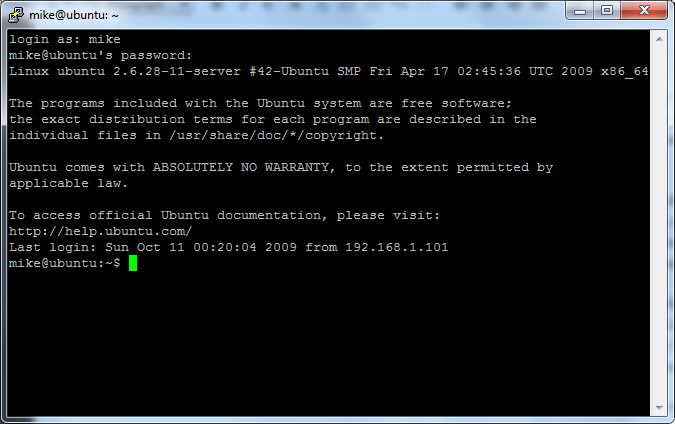
Now you can download PuTTY and log into your Ubuntu server from your workstation. Isn’t that Cool :)

PuTTY_Ubuntu

Thursday, October 08, 2009

Suteki Shop: Big in China

Suteki_shop_big_in_china

To my surprise, China is the biggest source of visits to the Suteki Shop project site. Slightly beating the US and with twice the traffic of the UK. It all seems to be down to a Chinese blogger called Daizhj who has a hugely detailed 10 post series which looks at pretty much every aspect of the project:

Asp.net MVC sample project "Suteki.Shop" analysis --- Installation chapter
Asp.net MVC sample project "Suteki.Shop" Analysis --- Controller
Asp.net MVC sample project "Suteki.Shop" Analysis --- Filter
Asp.net MVC sample project "Suteki.Shop" analysis --- Data validation
Asp.net MVC sample project "Suteki.Shop" Analysis --- ModelBinder
Asp.net MVC sample project "Suteki.Shop" Analysis --- ViewData
Asp.net MVC sample project "Suteki.Shop" analysis --- Model and Service
Asp.net MVC sample project "Suteki.Shop" Analysis --- IOC (Inversion of Control)
Asp.net MVC sample project "Suteki.Shop" analysis --- NVelocity template engine
Asp.net MVC sample project "Suteki.Shop" Analysis --- NHibernate

It’s amazing to find someone giving my little project such love. It makes me feel all warm inside :) It’s not all flattery though; For example, I love his comment in the Installation chapter when talking about this blog: “Unfortunately, the content is pitiful.” :D Harsh, but I can take it.

If you read this Daizhj, drop me a line, I’d love to hear from you.

The .NET Developer’s Guide to Windows Security

image A month ago I started a new reading regime where I get up an hour earlier and head off to a cafĂ© for an hour’s reading before work. It’s a very nice arrangement, since I seem to be in the perfect state of mind for a bit of technical reading first thing in the morning, and an hour is just about the right length of time to absorb stuff before my brain starts to hit overload.


I’ve had this book sitting on my bookshelf unread for a year or two, so it was the perfect candidate to kick off the new regime.

The book is formatted as a list of 75 items such as; “How to Run a Program as Another User”, “What is Role-Based Security”, “How to Use Service Principle Names”. The author, Keith Brown, has an easy to read style that dispatches answers clearly and expertly. Like all the best technical books, he doesn’t just say how things work, but often includes a little history about why they work that way. He’s also quick to outline best practices and share his opinion about the best security choices.

I think most Windows developers, me included, have a cargo-cult view of Windows Security. We pick up various tips and half-truths over the years and get around most security issues by a process of trial and error. All too often we simply give our applications elevated permissions simply because that’s the only way we can get them to work. A book like this should be essential reading, but unfortunately security is often some way down our list of priorities.

Keith Browns first and often repeated message is that we should always develop as a standard user. I’ve been doing this at home for some years now; in fact my first ever post on this blog back in 2005 was on this very subject. However, I can’t think of a single assignment I’ve had where my client’s developers where not logged in as Administrator. What little I do know about security has come from my standard user development experience, it makes you fully aware of what privileges your software is demanding and I’ve found I’ve been bitten far less by security related bugs. Working as a standard user is a message that’s drummed home throughout the book and is probably the best advice you could take away from it.

I’ve also gained a real insight into the way logon sessions work and how security tokens attach to them. I had no idea that every Windows resource has an owner and the implications of ownership. The sections on Kerberos, delegation and impersonation were also real eye-openers.

So if you too have misty ideas about how security works, you owe to yourself to read this book. Sure it’s not a very sexy subject, but it’ll make you a far better developer.

Monday, October 05, 2009

Brighton ALT.NET Beers! Tuesday 6th October.

The excellent Iain Holder has organised yet another Brighton ALT.NET Beers. It’s on Tuesday the 6th October, which is tomorrow, at the date of posting. The venue is moving from the rather noisy Prince Albert to the somewhat quieter Lord Nelson a little further down Trafalgar street.

image

Map picture

See you there!

Monday, September 28, 2009

MassTransit at Skills Matter

image

This Thursday, 1st October, I’m going to be giving a talk about MassTransit, a lean, open source, service bus for building loosely-coupled, message-based applications. The first half of the talk will be some general thoughts about message based architectures and why we should be considering them. The second half will be an overview of MassTransit. There will be plenty of code, but be warned, I’ve been getting crazy with Powerpoint animations to try and explain some of the concepts.

The talk is hosted by Gojko Adzic and SkillsMatter at the SkillsMatter offices which are located at the junction of St James's Walk and Sekforde Street, just northeast of Clerkenwell Green.

It’s free, but please register on the SkillsMatter site if you wish to attend.

See you there!

Friday, September 18, 2009

Why is ‘Buy’ not always better than ‘Build’

Building software is hard. I’ve been involved in building business systems for 13 years and it’s probably fair to say that I’ve been involved in more failures than successes, and I’m pretty sure that’s not merely the function of my effectiveness (or lack of it) as a software developer. Any business embarking on the development of a core system is taking on significant risk, because the core competencies of building software are probably not the core competencies of the business. After all the business of building software is a huge problem domain in its own right with a large and complex body of expertise.

Recognising this, many businesses when faced with a Buy vs Build decision will do almost anything to avoid Build; purchasing Commercial Off-The-Shelf (COTS) systems is always the preferred decision.

If your business need is a common one, then purchasing a COTS system is almost always the right choice. You would be insane to consider building a bespoke word processor for example.

But often it’s the case that your requirements are somewhat common, but with unique elements that only your business would need.

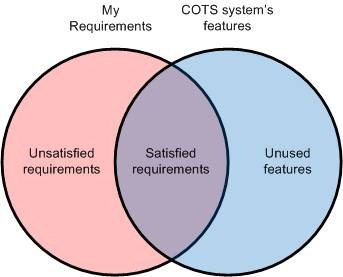
Given the understandable preference for Buy over Build, the temptation is to take a COTS system, or systems, and either fit your business around it, or have it customised in some way. So long as the features of the COTS software and your requirements overlap it’s worth buying it right?

clip_image002

Sure you will have some unsatisfied requirements and there will be some features of the COTS system that you don’t use, but you are still getting benefit. The unsatisfied requirements can be fulfilled by customising or extending the COTS package and the unused features can just be ignored.

You may have a requirement for customer relationship management for example; why not just buy MSCRM from Microsoft? The things your customers care about might be somewhat unique, but the Microsoft reseller will assure that MSCRM can be customised to meet your requirements. You might also have case-management style requirements alongside your customer relationship ones, why not buy a case management tool as well and simply integrate it with MSCRM?

But now, as soon as you decide to go down the COTS + customisation route, you are effectively doing software development. Except that now you have suckered your way into doing it rather than approaching it with your eyes open. You will find that extending and customising COTS systems is often a horrible variant of ugly hackery that’s almost impossible to do with good software craftsmanship. You will still have to hire developers, but instead of allowing them to build well architected solutions, you will be forcing them to do a dirty and thankless job. You can guess the calibre of developer that will be attracted to such a position.

The reason why it’s hackery is that it’s almost impossible to extend or customise software without rewriting at least a part of it; and of course, you won’t be able to rewrite your closed-source COTS system. To answer this, most COTS vendors pay some lip service to customisability and extensibility, but the hooks they provide are always somewhat clunky and limited. Anyone who has tried to build a system on top of Sharepoint, or customise MSCRM will know the pain involved. It’s the same for pretty much any enterprise software system.

Each additional requirement over and above the out-of-the-box features will cost significantly more than the equivalent additional requirement of a custom system.

You have a graph somewhat like this:

clip_image003

So long as your set of customisations is limited, it’s still worth going down the COTS route, but my experience is that the point where the two lines cross is further to the left than is often appreciated. The chart doesn’t of course factor in the original cost of the COTS system and that can be substantial for many ‘enterprise’ software packages.

A further consideration that’s often ignored is that business requirements often change over time. How are you going to ensure that your COTS system, even if it perfectly matches your requirements now, can continue to match them into the future?

So if you have to do software development, and you will have to unless you can find a COTS system that fully satisfies your requirements, why not do it properly: hire and nurture a great software team; put professional software development practices in place; properly analyse your business; work out exactly what you need from your supporting applications, and then build a system that exactly fits your needs.

An alternative might be to build a close relationship with a bespoke software house, but be aware that their incentives will not be fully aligned with yours and in any case, if your system is substantial, they will probably simply go to the open market and hire the same team of developers that you could have hired yourself.

So consider carefully the costs of a COTS system that doesn’t fully meet your requirements and don’t ignore the benefits that bespoke software built and supported by an in-house team can bring.

Wednesday, September 09, 2009

Slides and Code for last night’s VBug London NHibernate talk

Thanks to everyone who came to last night’s talk on NHibernate, and especially Sam Morrison of VBug for inviting me along and for Anteo Group for hosting the event.

You can download the code and slides from the talk here:
http://static.mikehadlow.com/Mike.NHibernateDemo.zip

The NHibernate homepage is here:
https://www.hibernate.org/343.html

Fluent NHibernate is here:
http://fluentnhibernate.org/

NHibernate Profiler is here:
http://nhprof.com/

NHibernate in Action by Pierre Henri KuatĂ©, Tobin Harris, Christian Bauer, and Gavin King is essential reading and can be purchased from the publisher, Manning’s, website:
http://www.manning.com/kuate/

image

Tuesday, September 01, 2009

Mocking Delegates

I never realised you could do this; use Rhino Mocks to mock a delegate:

using System;
using Rhino.Mocks;
using NUnit.Framework;

namespace Mike.MockingLambdas
{
    [TestFixture]
    public class Can_a_lambda_be_mocked
    {
        [Test]
        public void Lets_try()
        {
            const string text = "some text";

            var mockAction = MockRepository.GenerateMock<Action<string>>();
            var runsAnAction = new RunsAnAction(mockAction);
            runsAnAction.RunIt(text);

            mockAction.AssertWasCalled(x => x(text));
        }
    }

    public class RunsAnAction
    {
        private readonly Action<string> action;

        public RunsAnAction(Action<string> action)
        {
            this.action = action;
        }

        public void RunIt(string text)
        {
            action(text);
        }
    }
}