Thursday, November 04, 2010

Tardis Bank is now live

Tardis bank is a little web application I’ve put together. It provides an on-line pocket money bank account for parents and children. I originally wrote it for my Son and I to use, but anyone can sign up. So if you know anyone with kids between 5 and 15, ask them to give it a go.

Actually it went live on Monday, but I completely forgot to mention it here. You can find it at http://tardisbank.com. The code is on GitHub here: https://github.com/mikehadlow/Suteki.TardisBank. It’s a nice little sample of how to use MVC3, Windsor and RavenDb together.

tardisbank_frontpage

I had a great time presenting it at £5App here in Brighton on Tuesday night. The crowd there had some really good ideas about how I could improve it, as well as pointing out one particular bug :) To date, 42 parents and children have signed up to use it.

Using the Task Parallel Library with ASP.NET MVC for scalable web applications

Get the full sample solution from  GitHub: https://github.com/mikehadlow/Suteki.AsyncMvcTpl

Most applications spend most of their time doing IO operations. Communicating with a database or web service over the network or reading and writing files can take orders of magnitude longer than running instructions on the CPU. Web applications are no different, but have a additional complexity in that they are multi-threaded by nature, each request being served on a new thread. IIS only maintains a certain sized threadpool for handing requests and once all the threads are consumed, requests start to queue. You can mitigate this by doing asynchronous IO.

Using the new Task Parallel Library in .NET 4.0 makes building asynchronous controller actions much easier, and this post will show you how.

Here’s a common scenario. I have a controller action that makes a couple of calls to a service class:

[HttpGet]
public ViewResult Index()
{
    var user = userService.GetCurrentUser();
    userService.SendUserAMessage(user, "Hi From the MVC TPL experiment");
    return View(user);
}

The two methods I call on my UserService in turn make calls on two further classes:

public User GetCurrentUser()
{
    const int currentUserId = 10;
    return userRepository.GetUserById(currentUserId);
}

public void SendUserAMessage(User user, string message)
{
    emailService.SendEmail(user.Email, message);
}

Yes, this is an entirely contrived and simplified example, but the essentials are in place.

The UserRepository in turn uses ADO.NET to make a call to SQL Server to retrieve a row from the database:

public class UserRepository
{
    public User GetUserById(int currentUserId)
    {
        using (var connection = new SqlConnection("Data Source=localhost;Initial Catalog=AsncMvcTpl;Integrated Security=SSPI;"))
        {
            connection.Open();
            using (var command = connection.CreateCommand())
            {
                command.CommandText = "select * from [user] where Id = 10";
                command.CommandType = CommandType.Text;

                using (var reader = command.ExecuteReader())
                {
                    if (reader.HasRows)
                    {
                        reader.Read();
                        return new User((int)reader["Id"], (string)reader["Name"], (string)reader["Email"]);
                    }
                    throw new ApplicationException("No row with Id = 10 in user table");
                }
            }
        }
    }
}

The EmailService sends an email using the Standard System.Net.Mail.SmtpClient:

public void SendEmail(string emailAddress, string message)
{
    var mailMessage = new MailMessage("info@suteki.co.uk", emailAddress)
    {
        Subject = "Hello!",
        Body = "An important message from Nigeria :)"
    };

    var smtpClient = new SmtpClient("smtp.suteki.co.uk");
    smtpClient.Send(mailMessage);
}

Now, both the call to the database and the email dispatch are IO intensive. Most of the time, the IIS thread that the action executes on will be idle, waiting for first the database and then the email call to return. Even though the thread is mostly idle, it is still not available to process other requests. At some reasonable load, the requests will start to queue and eventually IIS will give up entirely and issue a 503 ‘server busy’ error.

However, both the SqlDataReader.ExecuteReader and the SmtpClient.Send methods have asynchronous versions. Under the bonnet these use operating system IO completion ports which means that the thread handling the request can be returned to the IIS threadpool while the IO operation completes.

The trick is to make sure that the entire stack from the action method down to the BCL call (the BeginExecuteReader and SendAsync calls) knows how to work asynchronously. Prior to the Task Parallel Library, this would have meant implementing BeginXXX and EndXXX methods at every layer (the Asynchronous Programming Model), so we would have had UserService.BeginGetCurrentUser and UserService.EndGetCurrentUser etc, and then on the UserRepository, BeginGetUserById / EndGetUserById. The code starts to look pretty formidable as well.

With the Task Parallel Library, we can represent any async operation as a Task or Task<T>. The first job is to wrap the BCL SqlDataReader and SmtpClient calls as tasks. For BCL classes that implement BeginXXX and EndXXX  methods we can just use the task factory’s FromAsync method, and that’s what we do here with the UserRepository’s GetUserById method:

public Task<User> GetUserById(int currentUserId)
{
    var connection =
        new SqlConnection("Data Source=localhost;Initial Catalog=AsncMvcTpl;Integrated Security=SSPI;Asynchronous Processing=true");
    connection.Open();
    var command = connection.CreateCommand();
    command.CommandText = "select * from [user] where Id = 10";
    command.CommandType = CommandType.Text;

    var readerTask = Task<SqlDataReader>.Factory.FromAsync(command.BeginExecuteReader, command.EndExecuteReader, null);
    return readerTask.ContinueWith(t =>
    {
        var reader = t.Result;
        try
        {
            if (reader.HasRows)
            {
                reader.Read();
                return new User((int)reader["Id"], (string)reader["Name"], (string)reader["Email"]);
            }
            throw new ApplicationException("No row with Id = 10 in user table");
        }
        finally 
        {
            reader.Dispose();
            command.Dispose();
            connection.Dispose();
        }
    });
}

Now GetUserById returns a Task<User> instead of a User. Effectively we are saying that the caller will get a user at some point in the future.

Once the reader has been wrapped in a task we can consume it with a continuation supplied to the ContinueWith method. The continuation can return a value, in our case a User, that then pops out of the ContinueWith method as the promise of a future user; a Task<User>.

SmtpClient doesn’t use APM, so turning its async operation into a task is a little more tricky, luckily this has already been done for us with the TPL team’s Parallel Extensions Extras library. I’m going to use that library’s SendTask extension method here:

public Task SendEmail(string emailAddress, string message)
{
    var mailMessage = new MailMessage("info@suteki.co.uk", emailAddress)
    {
        Subject = "Hello!",
        Body = "An important message :)"
    };

    var smtpClient = new SmtpClient("smtp.suteki.co.uk");
    return smtpClient.SendTask(mailMessage, null);
}

Because the synchronous version of this method returned void, we simply return Task here.

Now the power of the TPL really starts to work for us. We hardly have to change our UserService methods at all:

public Task<User> GetCurrentUser()
{
    const int currentUserId = 10;
    return userRepository.GetUserById(currentUserId);
}

public Task SendUserAMessage(User user, string message)
{
    return emailService.SendEmail(user.Email, message);
}

We are simply passing Task<User> and Task back up the stack, no need to implement Begin/End methods. This is very powerful.

Finally we come to the action method. This is where the code gets gnarly again. We have leave the lovely world of TPL and shoehorn it into the crappy MVC async controller:

public class HomeController : AsyncController
{
    readonly UserService userService = new UserService();

    [HttpGet]
    public void IndexAsync()
    {
        AsyncManager.OutstandingOperations.Increment();
        userService.GetCurrentUser().ContinueWith(t1 =>
        {
            var user = t1.Result;
            userService.SendUserAMessage(user, "Hi From the MVC TPL experiment").ContinueWith(t2 =>
            {
                AsyncManager.Parameters["user"] = user;
                AsyncManager.OutstandingOperations.Decrement();
            });
        });
        
    }

    public ViewResult IndexCompleted(User user)
    {
        return View(user);
    }
}

Jeff Prosise has a very nice post about the ASP.NET MVC async controller. You’d probably want to read that first. But simply put, you inherit from AsyncController and rather than calling your action ‘Index’ you split it into two and call it IndexAsync and IndexCompleted, the router understands this convention and correctly routes Home/Index to the IndexAsync action.

AsyncController has an AsyncManager that keeps track of async callbacks using its Increment/Decrement methods. When the count gets back to zero IndexCompleted is called. You can marshal state to the completed method using the AsyncManager’s Parameters dictionary as shown.

Once again we are using ContinueWith to supply continuations to grab the result of GetCurrentUser and then wait for the SendUserAMessage to complete.

Note that I haven’t considered exception handling in this example. You need to be very careful that you catch and notify exceptions that happen in async operations.

Now for my gripe. It would have been really slick if the MVC team had used TPL to implement async controller methods. I should be able to keep my single Index action but return a Task<ViewResult> instead. My async Index action would then look like this:

[HttpGet]
public Task<ViewResult> Index()
{
    return from user in userService.GetCurrentUser()
           from _ in userService.SendUserAMessage(user, "Hi From the MVC TPL experiment")
           select View(user);
}

Update: Craig Cav has implemented an async controller that does just this. You can read his post about it here. He’s branched my example and demonstrates the Task based async controller here.

Oh yes, tasks are monadic so you can compose them with Linq. No they are not, but the Linq extensions can be found in the TaksParallelExtensions library. See my post here for more info.

Should I care about this?

As with most scalability optimisations this makes your code more complex, harder to understand and harder to debug. I’ve been happily building web applications without doing this for years. You should only ever use this technique if you have an immediate scalability concern and you know that it is caused by a threadpool full of threads blocked by long running IO operations.

Having said that, if you do have these kinds of issues, then using the TPL like this makes them easier to solve than the older being/end spaghetti that you previously would have had to write.

It’s also worth noting that doing this kind of thing will become easier still with C#5’s new async operator. At that point it might we worth doing this kind of async IO as a matter of course.

Sunday, October 31, 2010

RavenDb Indexes : 1st Attempt

I’ve been playing with RavenDb’s pre-defined indexes today. They use a map reduce model with Linq, which is very nice. A recent new feature is the ability to define them in your application code. Here a couple I’ve just created:

public class Child_ByName : AbstractIndexCreationTask<Child>
{
    public Child_ByName()
    {
        Map = children => from child in children
                          select new { child.Name };
    }
}

public class Child_ByPendingSchedule : AbstractIndexCreationTask<Child>
{
    public Child_ByPendingSchedule()
    {
        Map = children => from child in children
                          from schedule in child.Account.PaymentSchedules
                          select new { schedule.NextRun };
    }
}

You register them with the RavenDb document store (a bit like a session factory in NHibernate) like this:

IndexCreation.CreateIndexes(typeof(Child_ByName).Assembly, store);

When you want to use them, you have to use a rather nasty magic string (RavenDb converts the underscore in the class name to a forward slash ‘/’).

var results = session.Advanced.LuceneQuery<Child>("Child/ByName").WhereEquals("Name", "two").ToList();

It would be much nicer if you could write something like this instead:

var results = session.Advanced.LuceneQuery<Child_ByName>().WhereEquals("Name", "two").ToList();

Here a couple of tests showing them at work:

[TestFixture]
public class RavenDbSchedulingWithIndex : LocalClientTest
{
    IDocumentStore store;
    Parent parent;
    DateTime now;

    [SetUp]
    public void SetUp()
    {
        store = NewDocumentStore();
        IndexCreation.CreateIndexes(typeof(Child_ByName).Assembly, store);
        parent = new Parent("Dad", "mike@mike.com", "xxx");

        now = new DateTime(2010, 4, 5);

        // create some children with accounts and schedules
        using (var session = store.OpenSession())
        {
            session.Store(CreateChildWithSchedule("one", 1M, now.AddDays(-2)));
            session.Store(CreateChildWithSchedule("two", 2M, now.AddDays(-1)));
            session.Store(CreateChildWithSchedule("three", 3M, now));
            session.Store(CreateChildWithSchedule("four", 4M, now.AddDays(1)));
            session.Store(CreateChildWithSchedule("five", 5M, now.AddDays(2)));
            session.SaveChanges();
        }
    }

    [Test]
    public void Select_child_using_ByName_index()
    {
        using (var session = store.OpenSession())
        {
            var results = session.Advanced.LuceneQuery<Child>("Child/ByName").WhereEquals("Name", "two").WaitForNonStaleResults().ToList();
            results.Count().ShouldEqual(1);
            results[0].Name.ShouldEqual("two");
        }
    }

    [Test]
    public void Select_child_using_ByPendingSchedule()
    {
        using (var session = store.OpenSession())
        {
            var results = session.Advanced
                .LuceneQuery<Child>("Child/ByPendingSchedule")
                .WhereLessThan("NextRun", now)
                .WaitForNonStaleResults().ToList();

            results.Count().ShouldEqual(2);
            results[0].Name.ShouldEqual("one");
            results[1].Name.ShouldEqual("two");
        }
    }

    Child CreateChildWithSchedule(string name, decimal amount, DateTime startDate)
    {
        var child = parent.CreateChild(name, name, "xxx");
        child.Account.AddPaymentSchedule(startDate, Interval.Week, amount, "Pocket Money");
        return child;
    }
    
}

This is some spike code from Tardis Bank. You can checkout the complete project here:

http://github.com/mikehadlow/Suteki.TardisBank

Thursday, October 28, 2010

Tardis Bank – online pocket money banking for parents and kids

tardisbank_frontpage

meandleo My son Leo (age 8) and I, that us on the right, have a bit of a pocket money problem. He’s supposed to get £2.00 every week, paid on Sunday. He has a Tardis shaped piggy bank, into which he’s supposed to put the £2.00. When he wants to buy something, he’s supposed to get the cash and take it to the shop.

The thing is, I’m a complete scatter brain and often forget to pay the weekly £2.00. Leo is also very spontaneous in his purchasing habits and will often decide he wants to buy something, but has forgotten to bring along his pocket money. In that situation, I buy whatever it is he wants and tell him that I will deduct it from next week’s pocket money…. which I then promptly forget.

We frequently have long discussions about how many weeks have gone past since his last payment and what I’ve bought on his behalf in the meantime. We loose all track of his real pocket money balance.

Regular pocket money is an important financial education for Leo. He needs to learn how to manage money, but without any proper accounting it just ends up being an arbitrary and irregular hand-over of cash and he learns nothing, except how to beg effectively.

These days most people don’t keep their money under the mattress. I use my bank’s online banking web site to manage my finances. What Leo needs is something similar for his pocket money. Once I started to think about our requirements I realised that it would be pretty straightforward to put together a simple web application. There’s also no reason why I couldn’t offer it to anyone who wanted something similar. A simple sign-on system, an account with a list of transactions and a simple payment schedule is all it needs.

Putting Tardis Bank together has been a great opportunity to play with some new technology. I’ve been wanting to have an experiment with the whole NoSQL thing, and RavenDb in particular for quite a while now, not to mention MVC3 Beta. So far the Raven experience has been very nice. Everything works out of the box, and it really makes putting together this kind of site friction free. Not having to worry about database schemas and the whole object-relational thing is very liberating.

I’m planning to present Tardis Bank at £5App here in Brighton next Tuesday, so it’s got to be live and working by then. In the meantime, there’s a holding page:

http://tardisbank.com/

And a GitHub repository for the code:

http://github.com/mikehadlow/Suteki.TardisBank

If you’ve got a spare minute, please check it out and let me know what you think. Any help, especially with the RavenDb usage patterns and the design stuff which I am awful at, would be much appreciated.

Wednesday, October 27, 2010

RavenDb, ASP.NET MVC and Windsor working together

I’m putting together a new project, TardisBank.com, using RavenDb, ASP.NET MVC and Windsor. It’s up on github here:

http://github.com/mikehadlow/Suteki.TardisBank

Here’s how I wire up Windsor and RavenDb.

First, in Global.asax.cs I initialise the container and ask it to load and run installers from all the application assemblies:

public class MvcApplication : System.Web.HttpApplication, IContainerAccessor
{
    ...

    protected void Application_Start()
    {
        AreaRegistration.RegisterAllAreas();

        RegisterGlobalFilters(GlobalFilters.Filters);
        RegisterRoutes(RouteTable.Routes);
        InitialiseContainer();
        InitialiseControllerFactory();
    }

    protected void InitialiseContainer()
    {
        if (container == null)
        {
            container = new WindsorContainer()
                .Install(
                    FromAssembly.InDirectory(new AssemblyFilter(HttpRuntime.BinDirectory, "Suteki.*.dll")));
        }
    }

    protected void InitialiseControllerFactory()
    {
        var controllerFactory = container.Resolve<IControllerFactory>();
        ControllerBuilder.Current.SetControllerFactory(controllerFactory);
    }

    static IWindsorContainer container;
    public IWindsorContainer Container
    {
        get { return container; }
    }
}

One of the installers it runs is my RavenInstaller:

public class RavenInstaller : IWindsorInstaller
{
    public void Install(IWindsorContainer container, IConfigurationStore store)
    {
        container.Register(
            Component.For<IDocumentStore>().Instance(CreateDocumentStore()).LifeStyle.Singleton,
            Component.For<IDocumentSession>().UsingFactoryMethod(GetDocumentSesssion).LifeStyle.PerWebRequest
            );
    }

    static IDocumentStore CreateDocumentStore()
    {
        var store = new DocumentStore
        {
            ConnectionStringName = "tardisConnection"
        };
        store.Initialize();
        return store;
    }

    static IDocumentSession GetDocumentSesssion(IKernel kernel)
    {
        var store = kernel.Resolve<IDocumentStore>();
        return store.OpenSession();
    }
}

Because Windsor already provides a global application store for both singleton and per-request components, we can give it the responsibility of handling the instantiation and lifecycle of the DocumentStore and DocumentSesssion. The DocumentStore is created and initialised once the first time it is requested. The DocumentSession has a PerWebRequest lifestyle and is created using a factory method the first time it is requested.

Don’t forget to register the PerRequestLifestyleModule in Web.config:

<system.webServer>
  <validation validateIntegratedModeConfiguration="false"/>
  
  <modules runAllManagedModulesForAllRequests="true">
    <add name="PerRequestLifestyle" type="Castle.MicroKernel.Lifestyle.PerWebRequestLifestyleModule, Castle.Windsor" />
  </modules>
</system.webServer>

Windsor will properly dispose both the DocumentStore when the application closes and the DocumentSession at the end of each request.

Tuesday, October 26, 2010

RavenDb: Playing with Inheritance and Polymorphism

Over the last couple of days I’ve been playing with RavenDb. So far it’s been a very nice experience. I love the way POCO objects get persisted as complete graphs. You can have nicely encapsulated models too, with private setters, and the client API is a joy to use.

I’m putting together a little project as an excuse to play with Raven, MVC3 and NuPack. I’ll put it up on github soon, but simply put it’s a virtual pocket money bank account for parents and their kids. The model has a concept of Parent and Child both of which inherit a User abstract base class. One of the first things I wanted to check was that the Raven can return a polymorphic collections of Users.

Here’s a test that shows that it can:

[Test]
public void Should_be_able_to_treat_Parents_and_Children_Polymorphically()
{
    using (var session = store.OpenSession())
    {
        var mike = new Parent("Mike Hadlow", "mike@yahoo.com");
        var leo = mike.CreateChild("Leo", "leohadlow", "xxx");
        var yuna = mike.CreateChild("Yuna", "yunahadlow", "xxx");
        var john = new Parent("John Robinson", "john@gmail.com");
        var jim = john.CreateChild("Jim", "jimrobinson", "xxx");

        session.Store(mike);
        session.Store(leo);
        session.Store(yuna);
        session.Store(john);
        session.Store(jim);
        session.SaveChanges();
    }

    using (var session = store.OpenSession())
    {
        var users = session.LuceneQuery<User>().WaitForNonStaleResults().ToArray();

        users.Length.ShouldEqual(5);

        users[0].Id.ShouldEqual("users/mike@yahoo.com");
        users[1].Id.ShouldEqual("users/leohadlow");
        users[2].Id.ShouldEqual("users/yunahadlow");
        users[3].Id.ShouldEqual("users/john@gmail.com");
        users[4].Id.ShouldEqual("users/jimrobinson");

        users[0].GetType().Name.ShouldEqual("Parent");
        users[1].GetType().Name.ShouldEqual("Child");
        users[2].GetType().Name.ShouldEqual("Child");
        users[3].GetType().Name.ShouldEqual("Parent");
        users[4].GetType().Name.ShouldEqual("Child");
    }
}

For this to work, you have to configure Raven to understand that the type ‘User’ is represented by documents with ids that look like ‘users/xxx’:

var documentStore = new DocumentStore
{
    Configuration = new RavenConfiguration
    {
        DataDirectory = path,
        RunInUnreliableYetFastModeThatIsNotSuitableForProduction = true
    },
    Conventions =
    {
        FindTypeTagName = type => typeof(User).IsAssignableFrom(type) ? "users" : null
    }
};

Other than that it just works.

Here’s my User class:

public abstract class User
{
    public string Id { get; private set; }
    public string Name { get; private set; }
    public string UserName { get; private set; }

    protected User(string name, string userName)
    {
        Id = string.Format("users/{0}", userName);
        Name = name;
        UserName = userName;
    }
}

Note the way that the User.Id gets created in the form ‘users/userName’.

Thursday, October 21, 2010

A Powershell Script for Monitoring Web Site Status

I’ve been having some problems with my server recently. If it restarts, because of windows update or for whatever reason, some of my websites can fail to start. I think it might be because WAS was configured as a manually started service, but I’m not sure. I wanted to be warned if any of the sites on my machine were down, and for an automatic restart to be attempted if they were.

I’ve written a little Powershell script to do this. It was an interesting exercise because one of the things that I wanted to do was get an email via my Google Apps account.

Am I insane? Is there a far easier and more obvious way of doing this? Let me know in the comments.

Here’s the script (and yes, I’m a total Powershell Noob :)

$fromAddress = "someServer@suteki.co.uk"
$toAddress = "mike.hadlow@suteki.co.uk"
$subject = "One or more websites are not responding"
$port = 587
$monitorPassword = "s0meN1cePa33w0rd"

$sites = @{
    "suteki.shop" = "http://suteki.shop/"; 
    "blue.shop" = "http://green.shop/"
    }

# send an email message via gmail
function SendMessage([string]$body)
{
    $message = new-object System.Net.Mail.MailMessage($fromAddress, $toAddress, $subject, $body)
    $smtpServer = "smtp.gmail.com"
    $client = new-object System.Net.Mail.SmtpClient($smtpServer)
    $client.EnableSsl = $TRUE
    $client.Port = 587
    $client.Credentials = new-object System.Net.NetworkCredential($fromAddress, $monitorPassword)
    $client.Send($message)
}

# make a request to the site and return the status code. Return 'Failed' if anything goes wrong
function CheckSiteStatus([string]$url)
{
    $req = [System.Net.HttpWebRequest]::Create($url)
    try
    {
        $res = $req.GetResponse()
        $res.StatusCode
    }
    catch
    {
        "Failed"
    }
}

function RestartSite([string]$site)
{
    C:\Windows\system32\inetsrv\appcmd stop site $site
    C:\Windows\system32\inetsrv\appcmd start site $site
}

function CheckSite([string]$url, [string]$site)
{
    $status = CheckSiteStatus $url
    if ($status -eq "OK")
    {
        ""
    }
    else
    {
        # attempt to restart site
        RestartSite $site
        "site '$site' failed to respond`n"
    }
}

function CheckSites()
{
    $body = ""
    foreach($site in $sites.Keys)
    {
        $url = $sites[$site]
        $body += CheckSite $url $site
    }
    if($body -ne "")
    {
        SendMessage $body
        $body
    }
    else
    {
        "OK"
    }
}

CheckSites

I’ve set it up with Task Scheduler to run every 10 minutes. One of the things I discovered when doing this is that if you say your task action is ‘C:\Scripts\Monitor.ps1’, you will just get notepad.exe executing You have to explicitly launch powershell and invoke: ‘powershell C:\Scripts\Monitor.ps1’.

Tuesday, October 19, 2010

Populating Drop Down Lists in ASP.NET MVC

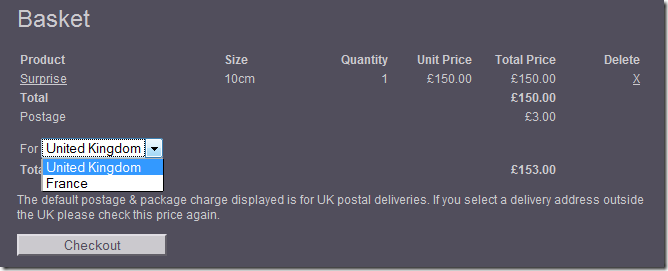
Here’s the shopping basket in Suteki Shop:

suteki_shop_basket

As you can see, there’s a drop-down-list of countries. The standard way of populating a drop-down-list is to pass the collection of countries as part of the view model from the controller action. This can get very tedious when you have multiple drop-downs on a form, the controller action soon gets bloated with data access for all that lookup data. It also violates the thunderdome principle: one model in, one model out.

This lookup data is not something that the controller should really have to care about. I would much rather the data just appeared in the drop-down by convention. In the case above, the basket has a property of type Country, so why couldn’t convention just say: if you want to set the country then you need a list of all the countries?

With this in mind, I’ve put together an HtmlHelper extension method, ComboFor which can create a drop-down list for any entity type that implements my INamedEntity interface, so now I just have to write:

<%= Html.ComboFor(x => x.Country) %>

Which produces this HTML:

<select id="Country_Id" name="Country.Id">
    <option selected="selected" value="1">United Kingdom</option> 
    <option value="2">France</option> 
</select>

The extension method itself looks like this:

public static string ComboFor<TModel, TLookup>(this HtmlHelper<TModel> htmlHelper, Expression<Func<TModel, TLookup>> propertyExpression)
    where TLookup : INamedEntity
{
    return htmlHelper.With<IComboFor<TLookup, TModel>, TModel>(combo => combo.BoundTo(propertyExpression));
}

My ‘With’ extension method looks up services in the IoC container so that I can do dependency injection in HtmlHelper extension methods.

The implementation of IComboFor looks like this:

public class ComboFor<TEntity, TModel> : IComboFor<TEntity, TModel>, IRequireHtmlHelper<TModel> where TEntity : class, INamedEntity
{
    readonly IRepository<TEntity> repository;
    protected Expression<Func<TEntity, bool>> WhereClause { get; set; }
    protected string PropertyNamePrefix { get; set; }

    public ComboFor(IRepository<TEntity> repository)
    {
        this.repository = repository;
    }
    public string BoundTo(Expression<Func<TModel, TEntity>> propertyExpression, Expression<Func<TEntity, bool>> whereClause, string propertyNamePrefix)
    {
        WhereClause = whereClause;
        PropertyNamePrefix = propertyNamePrefix;
        return BoundTo(propertyExpression);
    }

    public string BoundTo(Expression<Func<TModel, TEntity>> propertyExpression, Expression<Func<TEntity, bool>> whereClause)
    {
        WhereClause = whereClause;
        return BoundTo(propertyExpression);
    }

    public string BoundTo(Expression<Func<TModel, TEntity>> propertyExpression, string propertyNamePrefix)
    {
        PropertyNamePrefix = propertyNamePrefix;
        return BoundTo(propertyExpression);
    }

    public string BoundTo(Expression<Func<TModel, TEntity>> propertyExpression)
    {
        var getPropertyValue = propertyExpression.Compile();
        var propertyName = (!String.IsNullOrEmpty(PropertyNamePrefix) ? PropertyNamePrefix : "")
            + Utils.ExpressionHelper.GetDottedPropertyNameFromExpression(propertyExpression) + ".Id";

        var viewDataModelIsNull = (!typeof(TModel).IsValueType) && HtmlHelper.ViewData.Model == null;
        var selectedId = viewDataModelIsNull ? 0 : getPropertyValue(HtmlHelper.ViewData.Model).Id;
        return BuildCombo(selectedId, propertyName);
    }


    public override string ToString()
    {
        return BuildCombo(0, typeof(TEntity).Name + "Id");
    }

    protected virtual string BuildCombo(int selectedId, string htmlId)
    {
        if (string.IsNullOrEmpty(htmlId))
        {
            throw new ArgumentException("htmlId can not be null or empty");
        }

        if (HtmlHelper == null)
        {
            throw new SutekiCommonException("HtmlHelper is null");
        }
        return HtmlHelper.DropDownList(htmlId, GetSelectListItems(selectedId)).ToString();
    }

    protected IEnumerable<SelectListItem> GetSelectListItems(int selectedId)
    {
        var queryable = repository.GetAll();
        if (WhereClause != null)
        {
            queryable = queryable.Where(WhereClause);
        }
        var enumerable = queryable.AsEnumerable();

        if (typeof(TEntity).IsOrderable())
        {
            enumerable = enumerable.Select(x => (IOrderable)x).InOrder().Select(x => (TEntity)x);
        }
        
        if (typeof(TEntity).IsActivatable())
        {
            enumerable = enumerable.Select(x => (IActivatable)x).Where(a => a.IsActive).Select(x => (TEntity)x);
        }
        
        var items = enumerable
            .Select(e => new SelectListItem { Selected = e.Id == selectedId, Text = e.Name, Value = e.Id.ToString() });

        return items;
    }

    public HtmlHelper<TModel> HtmlHelper { get; set; }
}

The interesting bit is the ‘GetSelectListItems’ method which gets the select list items from the repository. You have a chance here to provide a Linq where clause to filter the items. It also understands my IOrderable and IActivatable interfaces, so any entity that implements IOrderable will be shown in the correct order in the drop down, and any that implement IActivatable will only appear if they are active.

All this works because of conventions and polymorphism. Now I have much simpler controller actions that usually have a model as the argument and return a model in the ViewResult. Nice!

Friday, October 15, 2010

ASP.NET MVC Controller Action Unit Test Extension Methods

Testing the ActionResult returned by a controller action can be a PITA. You have to get the view name, check that it's correct, get the model, make sure it’s the right type and then do various asserts against it.

We’ve put together a set of extension methods that make writing controller action tests a breeze. Here’s are some examples:

[Test]
public void Show_should_get_reviews_for_product()
{
    controller.Show(1)
        .ReturnsViewResult()
        .WithModel<Product>()
        .AssertAreSame(productRepository.GetById(1), x => x)
        .AssertAreEqual(2, x => x.Reviews.Count());
}

[Test]
public void New_renders_view()
{
    controller.New(5)
        .ReturnsViewResult()
        .WithModel<Review>()
        .AssertAreSame(product, x => x.Product);
}

[Test]
public void NewWithPost_saves_review()
{
    var review = new Review { Product = new Product { Id = 5 } };
    
    controller.New(review)
        .ReturnsRedirectToRouteResult()
        .ToAction("Submitted")
        .WithRouteValue("Id", "5");

    reviewRepository.AssertWasCalled(x => x.SaveOrUpdate(review));
}

You can grab the latest version of the extension methods here:

http://code.google.com/p/sutekishop/source/browse/trunk/Suteki.Shop/Suteki.Common/TestHelpers/ActionResultExtensions.cs

Happy testing!

Update: Jeremy Skinner tells me that the same or similar extension methods are also available in MvcContrib.

Thursday, October 14, 2010

Use a Single Version File For All Projects in a Solution

It’s a good idea for all the assemblies in a single solution to have the same version number, but the default in Visual Studio is for each project to have it’s own AssemblyInfo.cs file, each with it’s own version number. However it’s easy to share a single Version.cs file between all the projects.

First create the Version.cs file as a solution item (right click on the solution, Add, New Item). It should look something like this:

using System.Reflection;

[assembly: AssemblyVersion("2.0.1.442")]
[assembly: AssemblyFileVersion("2.0.1.442")]

version_file_solution_explorer

Now remove those same lines (AssemblyVersion and AssemblyFileVersion) from the AssemblyInfo.cs file in each project in the solution.

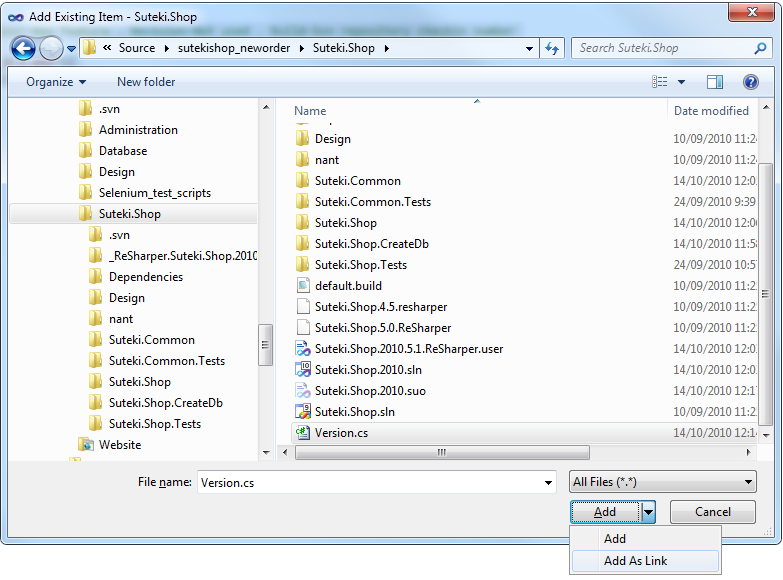
The next step to add a link to the Version.cs file to each project. Right click on the project and choose ‘Add New Item’ and then ‘Existing Item’. Browse to the Version.cs file in the solution root directory and add it as a link (click on the little drop down arrow on the ‘Add’ button in the file dialogue):

version_add_link

Do this to all your projects. Now you only have to maintain the version number for the whole solution in one place. Nice!

It’s common practice to integrate version numbering with continuous integration. This usually works by having the CI build process update the version number with the build number before each build. Having the number represented in one place makes that much easier.

One last thing you should always do is provide a way for anyone to discover the version number of a running instance of your application. With an ASP.NET MVC web application, it’s a simple as this little controller action:

public ActionResult Version()
{
    var version = Assembly.GetExecutingAssembly().GetName().Version;
    var versionMessage = string.Format("Suteki Shop. Version {0}.{1}.{2}.{3}", 
        version.Major, version.Minor, version.Build, version.MinorRevision);
    return Content(versionMessage);
}

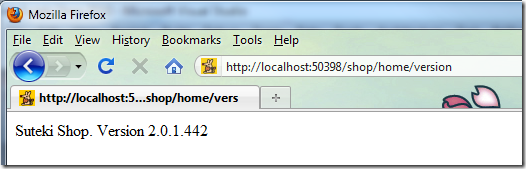
Now if ever I need to know the version of a running instance I can just type the …/Version URL:

suteki.shop_versionnumber