Tuesday, October 29, 2013

RabbitMQ Request-Response Pattern

If you are programming against a web service, the natural pattern is request-response. It’s always initiated by the client, which then waits for a response from the server. It’s great if the client wants to send some information to a server, or request some information based on some criteria. It’s not so useful if the server wants to initiate the send of some information to the client. There we have to rely on somewhat extended HTTP tricks like long-polling or web-hooks.

With messaging systems, the natural pattern is send-receive. A producer node publishes a message which is then passed to a consuming node. There is no real concept of client or server; a node can be a producer, a consumer, or both. This works very well when one node wants to send some information to another or vice-versa, but isn’t so useful if one node wants to request information from another based on some criteria.

All is not lost though. We can model request-response by having the client node create a reply queue for the response to a query message it sends to the server. The client can set the request message properties’ reply_to field with the reply queue name. The server inspects the reply_to field and publishes the reply to the reply queue via the default exchange, which is then consumed by the client.
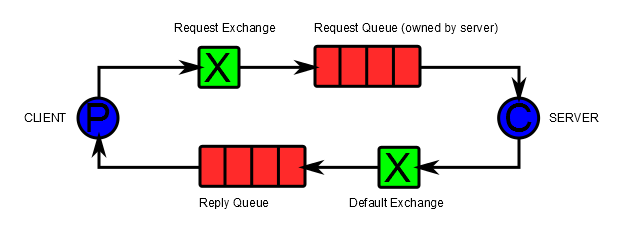
request-response

The implementation is simple on the request side, it looks just like a standard send-receive. But on the reply side we have some choices to make. If you Google for ‘RabbitMQ RPC’, or ‘RabbitMQ request response’, you will find several different opinions concerning the nature of the reply queue.

  • Should there be a reply queue per request, or should the client maintain a single reply queue for multiple requests?
  • Should the reply queue be exclusive, only available to this channel, or not? Note that an exclusive queue will be deleted when the channel is closed, either intentionally, or if there is a network or broker failure that causes the connection to be lost.

Let’s have a look at the pros and cons of these choices.

Exclusive reply queue per request.

Here each request creates a reply queue. The benefits are that it is simple to implement. There is no problem with correlating the response with the request, since each request has its own response consumer. If the connection between the client and the broker fails before a response is received, the broker will dispose of any remaining reply queues and the response message will be lost.

The main implementation issue is that we need to clean up any replies queues in the event that a problem with the server means that it never publishes the response.

This pattern has a performance cost because a new queue and consumer has to be created for each request.

Exclusive reply queue per client

Here each client connection maintains a reply queue which many requests can share. This avoids the performance cost of creating a queue and consumer per request, but adds the overhead that the client needs to keep track of the reply queue and match up responses with their respective requests. The standard way of doing this is with a correlation id that is copied by the server from the request to the response.

Once again, there is no problem with deleting the reply queue when the client disconnects because the broker will do this automatically. It does mean that any responses that are in-flight at the time of a disconnection will be lost.

Durable reply queue

Both the options above have the problem that the response message can be lost if the connection between the client and broker goes down while the response is in flight. This is because they use exclusive queues that are deleted by the broker when the connection that owns them is closed.

The natural answer to this is to use a non-exclusive reply queue. However this creates some management overhead. You need some way to name the reply queue and associate it with a particular client. The problem is that it’s difficult for the client to know if any one reply queue belongs to itself, or to another instance. It’s easy to naively create a situation where responses are being delivered to the wrong instance of the client. You will probably wind up manually creating and naming response queues, which removes one of the main benefits of choosing broker based messaging in the first place.

 EasyNetQ

For a high-level re-useable library like EasyNetQ the durable reply queue option is out of the question. There is no sensible way of knowing whether a particular instance of the library belongs to a single logical instance of a client application. By ‘logical instance’ I mean an instance that might have been stopped and started, as opposed to two separate instances of the same client.

Instead we have to use exclusive queues and accept the occasional loss of response messages. It is essential to implement a timeout, so that an exception can be raised to the client application in the event of response loss. Ideally the client will catch the exception and re-try the message if appropriate.

Currently EasyNetQ implements the ‘reply queue per request’ pattern, but I’m planning to change it to a ‘reply queue per client’. The overhead of matching up responses to requests is not too onerous, and it is both more efficient and easier to manage.

I’d be very interested in hearing other people’s experiences in implementing request-response with RabbitMQ.

Wednesday, October 23, 2013

EasyNetQ: Publisher Confirms

logo_design_150

Publisher confirms are a RabbitMQ addition to AMQP to guarantee message delivery. You can read all about them here and here. In short they provide a asynchronous confirmation that a publish has successfully reached all the queues that it was routed to.

To turn on publisher confirms with EasyNetQ set the publisherConfirms connection string parameter like this:

var bus = RabbitHutch.CreateBus("host=localhost;publisherConfirms=true");

When you set this flag, EasyNetQ will wait for the confirmation, or a timeout, before returning from the Publish method:

bus.Publish(new MyMessage
    {
        Text = "Hello World!"
    });
// here the publish has been confirmed.

Nice and easy.

There’s a problem though. If I run the above code in a while loop without publisher confirms, I can publish around 4000 messages per second, but with publisher confirms switched on that drops to around 140 per second. Not so good.

With EasyNetQ 0.15 we introduced a new PublishAsync method that returns a Task. The Task completes when the publish is confirmed:

bus.PublishAsync(message).ContinueWith(task =>
    {
        if (task.IsCompleted)
        {
            Console.WriteLine("Publish completed fine.");
        }
        if (task.IsFaulted)
        {
            Console.WriteLine(task.Exception);
        }
    });

Using this code in a while loop gets us back to 4000 messages per second with publisher confirms on.

Happy confirms!

Tuesday, October 22, 2013

AsmSpy Coloured Output

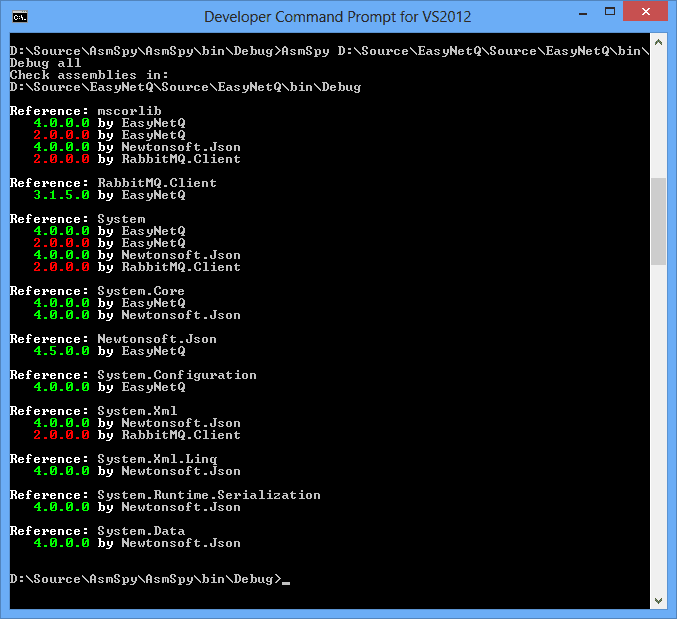
AsmSpy is a little tool I put together a while back to view assembly reference conflicts. Even though it took just an hour or so to knock together, it’s proved to be one of my more successful open source offerings. Since I initially put it up on GitHub there have been a trickle of nice pull requests. Just today I got an excellent coloured output submission from Mahmoud Samy Abuzied which makes it much easier to see the version conflicts.

Here’s the output from EasyNetQ showing that it’s awkwardly using two different versions of the .NET runtime libraries.

AsmSpy_colored

I’ve also uploaded a build of AsmSpy.exe to Amazon S3 so you now don’t have to clone the repository and build it yourself. Grab it from http://static.mikehadlow.com/AsmSpy.zip

Happy conflicting!

Monday, October 21, 2013

EasyNetQ: Big Breaking Changes in the Publish API

logo_design_150

From version 0.15 the way that publish works in EasyNetQ has dramatically changed. Previously the client application was responsible for creating and disposing the AMQP channel for the publication, something like this:

using (var channel = bus.OpenPublishChannel())
{
    channel.Publish(message);
}

There are several problems with this approach.

The practical ones are that it encourages developers to use far more channels than they need to. The codebases that I’ve looked at often have the pattern exactly as it’s given above, even if publish is invoked in a loop. Channel creation is relatively cheap, but it’s not free and frequent channel creation imposes a cost on the broker. However, if a developer tries to keep a channel open for a number of publish calls, they then have to deal with the complex scenario of recovering from a connection loss.

The more conceptual, design oriented problem, is that it fails in terms of EasyNetQ’s mission statement, which is to make building .NET applications with RabbitMQ as easy as possible. With the core (IBus) API, the developer shouldn’t have to be concerned about AMQP specifics like channel handling, the library should do all that for them.

From version 0.15, you don’t need to open a publish channel, simply call the new Publish method directly on the IBus interface:

bus.Publish(message);

Internally EasyNetQ maintains a single channel for all outgoing AMQP calls and marshals all client invocations onto a single internally maintained thread. So while EasyNetQ is thread-safe, all internal calls to the RabbitMQ.Client library are serialised. Consumers haven’t changed and are invoked from a separate thread.

The Request call has also been moved to the IBus API:

bus.Request<TestRequestMessage, TestResponseMessage>(new TestRequestMessage {Text = "Hello World!"},
    response => Console.WriteLine("Got response: " + response.Text));

The change also means that EasyNetQ can take full responsibility for channel reconnection in the event of connection failure and leads to a much nicer publisher confirms implementation which I’ll be blogging about soon.

Happy messaging!

Wednesday, October 16, 2013

Brighton Fuse

brighton_fuse

Last night I attended the launch of The Brighton Fuse report. This is the result of a two year research project into Brighton’s Creative, Digital and IT (CDIT) sector. It’s one of the most detailed investigations into a tech cluster ever carried out in the UK and makes fascinating reading. I was involved as one of the interviewees, so I’ve got a personal interest in the findings.

The research found 1,485 firms which fit the CDIT label operating in the city. Of these they sampled 485. For me the most surprising results are the size and rate of growth of the CDIT sector. As someone who’s lived and worked in Brighton over the last 18 years, I’ve certainly been aware of it, but had no idea of the scale. The numbers from the survey are very impressive. Brighton is of course famous as a resort town, ‘London on sea’, but the CDIT sector is now equivalent to the tourist industry, with both generating around £700 million in sales. Around 9000 people work in the sector, that’s 10% of Brighton’s workforce. The rate of growth is phenomenal: 14% annually, and that’s in the context of recession conditions in the UK as  whole. It accounts for all the job growth in Brighton, and makes the city one of the fastest growing in the UK.

Why Brighton? Why should such a dynamic cluster of companies spring up here, rather than in any of the tens of other medium sized cities in the UK? According to the report, it’s not because of any government initiative, or the presence of any large leading companies in the sector, or even because entrepreneurs made a conscious decision to start companies here. No, it seems to simply to be that it’s a very attractive place to live. People come here (85% of founders are from outside Brighton) because they want to live here, not for economic opportunity. The kinds of people who are attracted to Brighton also seem to be the kinds of people who have a tendency to start creative digital businesses. It even seems to be that some of the economic disadvantages of Brighton, the lack of large established employers, leaves many with little alternative to becoming entrepreneurs.

So what makes Brighton so attractive? There are the obvious geographic advantages: London, Europe’s, if not the world’s, capital city, is only an hour’s train ride away; Gatwick, one of London’s three main airports, is just up the A23. It’s truly beautiful. Sussex has a world class landscape with the South Downs national park rolling down to the white cliffs; and of course there’s the sea. If you are at all interested in history, it’s a constant delight; I can take a 20 minute walk from my house in Lewes, past a Norman castle, the 15th century half-timbered home of a Tudor queen and an Elizabethan mansion.  But it’s the cultural side of Brighton that is probably its main attraction. It has a strong identity as the bohemian capital of the UK, with the largest gay population outside London and the biggest arts festival in England. Almost every weekend there’s some event or festival going on. We have the UK’s only green MP and the only Green controlled council. It’s also the least religious place in the UK, but conversely has the highest number of Jedi Knights (2.6% of the population indeed).

To sum up the findings of the report: (warning: personal tongue-in-cheek, not-to-be-taken-seriously interpretation follows)

In order to create a successful CDIT cluster, do the following:

  1. Find somewhere pretty with good transport links and access to London.
  2. Throw in a couple of universities.
  3. Add an arts festival.
  4. Avoid big government or commercial institutions.
  5. Discourage conservatives and Christians.
  6. Make it a playground for bohemians, gays and artists.
  7. Leave to simmer.

My personal anecdotal experience of living in Brighton over the last 18 years chimes nicely with the report’s findings. I arrived in Brighton in 1995, after two years living in Japan, to attend an Information Systems MSc at Brighton University. I immediately fell in love with the place, but after graduating I moved to London for work since there were few programming jobs available in the city. But I couldn’t stay away and came back and bought a flat here in 1997. I commuted for the first year or so, but then got a job as a junior programmer at American Express, one of Brighton’s few large corporate employers. By then the dot-com boom was raging and I left after six months to double my income as a freelancer. I haven’t looked back. Up until around 2007 I rarely found clients in Brighton, but would travel to work at client sites throughout the South East. Since 2007, with the growth of the CDIT sector, the opposite has been the case; I haven’t worked more than half a mile from Brighton station.

Three of my local clients have been exactly the kinds of businesses covered in the report: Cubeworks, a digital agency; Madgex, a product company selling SaaS jobsites; and 15below, my current clients, who build airline integration systems. All started around 10 years ago as small 2, 3, or 4 man operations, and all have grown rapidly since. 15below, for example, now has close to 70 employees and a multi-million pound annual turnover. Cubeworks grew rapidly into a successful agency brand and has since been acquired, and Madgex has grown to around 40 employees. All show huge growth rates and not only provide employment, but also clients for a large pool of freelancers like me.

Despite the recession in the rest of the UK, it’s now an incredibly exciting time to be working as a freelancer in Brighton. There’s a real buzz about the place, and you can’t turn a corner without bumping into somebody who’s about to start a new indie-game company or launch their kickstarter. Of course there’s a certain amount of pretention and froth that inevitably goes with it, but there’s enough genuine success to feel like we’re in the midst of something rather wonderful.

Download and read the report, I’ll think you’ll be impressed too.

Tuesday, September 24, 2013

EasyNetQ: IConsumerDispatcher

logo_design_150

EasyNetQ has always had a single dispatcher thread that runs user message handlers. This means that a slow handler on one queue can cause other handlers on other queues to wait. The intention is that one shouldn’t write long running consumers. If you are doing long running IO you should use the SubsribeAsync method and return a task that completes when the long running IO completes.

A recent change to EasyNetQ has been to make the dispatcher a separate abstraction. This means you can replace it with your own implementation if desired.

IConsumerDispatcher

Inside EasyNetQ the dispatcher receives deliveries from the RabbitMQ C# Client library and places the delivery information on an internal concurrent queue. By default, all consumers share a single internal queue. A single dispatcher thread pulls deliveries from the queue and then asks the consumer to invoke the user message handler.

The consumer dispatcher implementation is very simple, it simply maintains a queue of Action and a thread which takes those actions from the end of the queue and runs them. You could use the same pattern whenever you need to marshal an action onto a single thread. I wrote about this more general terms here.

public class ConsumerDispatcher : IConsumerDispatcher
{
    private readonly Thread dispatchThread;
    private readonly BlockingCollection<Action> queue = new BlockingCollection<Action>();
    private bool disposed;

    public ConsumerDispatcher(IEasyNetQLogger logger)
    {
        Preconditions.CheckNotNull(logger, "logger");

        dispatchThread = new Thread(_ =>
            {
                try
                {
                    while (true)
                    {
                        if (disposed) break;

                        queue.Take()();
                    }
                }
                catch (InvalidOperationException)
                {
                    // InvalidOperationException is thrown when Take is called after 
                    // queue.CompleteAdding(), this is signals that this class is being
                    // disposed, so we allow the thread to complete.
                }
                catch (Exception exception)
                {
                    logger.ErrorWrite(exception);
                }
            }) { Name = "EasyNetQ consumer dispatch thread" };
        dispatchThread.Start();
    }

    public void QueueAction(Action action)
    {
        Preconditions.CheckNotNull(action, "action");
        queue.Add(action);
    }

    public void Dispose()
    {
        queue.CompleteAdding();
        disposed = true;
    }
}

An implementation of IConsumerDispatcherFactory maintains a single instance of IConsumerDispatcher:

public class ConsumerDispatcherFactory : IConsumerDispatcherFactory
{
    private readonly Lazy<IConsumerDispatcher> dispatcher;

    public ConsumerDispatcherFactory(IEasyNetQLogger logger)
    {
        Preconditions.CheckNotNull(logger, "logger");
        
        dispatcher = new Lazy<IConsumerDispatcher>(() => new ConsumerDispatcher(logger));
    }

    public IConsumerDispatcher GetConsumerDispatcher()
    {
        return dispatcher.Value;
    }
    
    public void Dispose()
    {
        if (dispatcher.IsValueCreated)
        {
            dispatcher.Value.Dispose();
        }
    }
}

If you wanted to use an alternative dispatch strategy; say for example you (quite reasonably) wanted a new dispatch thread for each consumer, you would simply implement an alternative IConsumerDispatcherFactory and register it with EasyNetQ like this:

var bus = RabbitHutch.CreateBus("host=localhost", 
    x => x.Register<IConsumerDispatcherFactory>(_ => new MyConsumerDispatcherFactory()));

Happy messaging!

Monday, September 23, 2013

RabbitMQ: AMQP Channel Best Practices

I’ve long been confused with best practices around AMQP channel handling. This post is my attempt to explain my current thoughts, partly in an attempt to elicit feedback.

The conversation between a message broker and a client is two-way. Both the client and the server can initiate ‘communication events’; the client can invoke a method on the server: ‘publish’ or ‘declare’, for example; and the server can invoke a method on the client such as ‘deliver’ or ‘reject’. Because the client needs to receive methods from the server, it needs to keep a connection open for its lifetime. This means that broker connections may last long periods; hours, days, or weeks. Maintaining these connections is expensive, both for the client and the server. In order to have many logical connections without the overhead of many physical TCP/IP connections, AMQP has the concept of ‘channel’ (confusingly represented by the IModel interface in the Java and .NET clients). You can create multiple channels on a single connection and it’s relatively cheap to create and dispose of them.

But what are the recommended rules for handling these channels? Should I create a new one for every operation? Or should I just keep a single one around and execute every method on it?

First some hard and fast rules (note I’m using the RabbitMQ .NET client for reference here, other clients might have different behaviour):

Channels are not thread safe. You should create and use a channel on a single thread. From the .NET client documentation (section 2.10):

“In general, IModel instances should not be used by more than one thread simultaneously: application code should maintain a clear notion of thread ownership for IModel instances.”

Apparently this is not a hard and fast rule with the Java client, just good advice. The java client serializes all calls to a channel.

An ACK should be invoked on the same channel on which the delivery was received. The delivery tag is scoped to the channel and an ACK sent to a different channel from which the delivery was received will cause a channel error. This somewhat contradicts the ‘Channels are not thread safe’ directive above since you will probably ACK on a different thread from one where you invoked basic.consume, but this seems to be acceptable.

Now some softer suggestions:

It seems neater to create a channel for each consumer. I like thinking of the consumer and channel as a unit: when I create a consumer, I also create a channel for it to consume from. When the consumer goes away, so does the channel and vice-versa.

Do not mix publishing and consuming on the same channel. If you follow the suggestion above, it implies that you have dedicated channels for each consumer. It follows that you should create separate channels for server and client originated methods.

Maintain a long running publish channel. My current implementation of EasyNetQ makes creating channels for publishing the responsibility of the user. I now think this is mistake. It encourages the pattern of: create a channel, publish, dispose the channel. This pattern doesn’t work with publisher confirms where you need to keep the channel open at least until you receive an ACK or NACK. And although creating channels is relatively lightweight, there is still some overhead. I now favour the approach of maintaining a single publish channel on a dedicated thread and marshalling publish (and declare) calls to it. This is potentially a bottleneck, but the impressive performance of non-transactional publishing means that I’m not overly concerned about it.

Thursday, September 12, 2013

EasyNetQ: Topic Confusion!

This is a quick post to highlight a common cause of confusion when people play with topics in EasyNetQ.

You can subscribe to a message type with a topic like this:

bus.Subscribe<MyMessage>("id1", myHandler, x => x.WithTopic("X.*"));

Topics are dot separated strings that match with the routing key attached to a message at publication. In the code above I’ve said, give me any message of type MyMessage who’s topic matches “x.*”. The ‘*’ character is a wildcard, so “X.A” would match, as would “X.Z”, but “Y.A” wouldn’t.

You publish with a topic like this:

using (var publishChannel = bus.OpenPublishChannel())
{
    publishChannel.Publish(myMessage, x => x.WithTopic("X.A"));
}

The confusion occurs when the topic in the subscribe call changes. Maybe you are experimenting with topics by changing the string in the WithTopic( … ) method, or perhaps you are hoping to dynamically change the topic at runtime? Maybe you’ve done several subscribes, each with a different handler and a different topic, but the same subscription Id. Either way, you’ll probably be surprised to find that you still get all the messages matched by previously set topics as well as those matched by the current topic.

In order to explain why this happens, let’s look at how EasyNetQ creates exchanges, queues and bindings when you call these API methods.

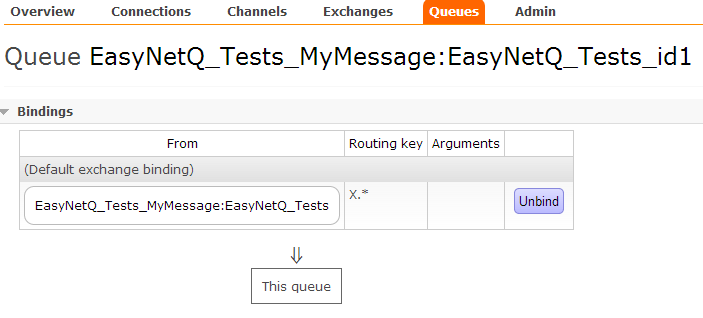
If I call the subscribe method above, EasyNetQ will declare a topic-exchange named after the type, a queue named after the type and the subscription id, and a bind them with the given topic:

queue_binding_with_topic

If I change the topic and run the code again like this:

bus.Subscribe<MyMessage>("id1", myHandler, x => x.WithTopic("Y.*"));

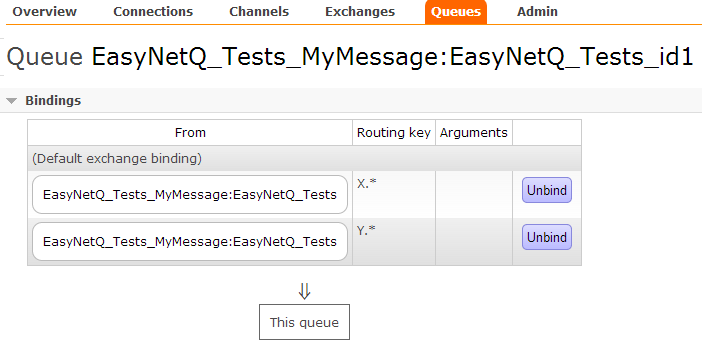
EasyNetQ will declare the same queue and exchange. The word ‘declare’ is the key here, it means, “if the object doesn’t exist, create it, otherwise do nothing.” The queue and exchange already exist, so declaring them has no effect. EasyNetQ then binds them with the given routing key. The original binding still exists – we haven’t done anything to remove it – so we now have two bindings with two different topics between the exchange and the queue:

queue_binding_with_topic2

This means that any message matching ‘X.*’ or ‘Y.*’ will be routed to the queue, and thus to our consumer.

So, beware when playing with topics!

As an aside, the ability to create multiple bindings is a very powerful feature. It allows you to implement ‘OR’ semantics for routing messages. If this is what you want, you should concatenate multiple WithTopic methods rather than make multiple calls to Subscribe. For example, say we wanted to implement ‘*.B OR Y.*’:

bus.Subscribe<MyMessage>("id4", myHandler, x => x.WithTopic("Y.*").WithTopic("*.B"));

Which would give us the desired result:

queue_binding_with_topic3

Happy routing!

Tuesday, September 10, 2013

EasyNetQ: Big Breaking Changes in the Advanced Bus

logo_design_240
EasyNetQ is my little, easy to use, client API for RabbitMQ. It’s been doing really well recently. As I write this it has 24,653 downloads on NuGet making it by far the most popular high-level RabbitMQ API.
The goal of EasyNetQ is to make working with RabbitMQ as easy as possible. I wanted junior developers to be able to use basic messaging patterns out-of-the-box with just a few lines of code and have EasyNetQ do all the heavy lifting: exchange-binding-queue configuration, error management, connection management, serialization, thread handling; all the things that make working against the low level AMQP C# API, provided by RabbitMQ, such a steep learning curve.
To meet this goal, EasyNetQ has to be a very opinionated library. It has a set way of configuring exchanges, bindings and queues based the .NET type of your messages. However, right from the first release, many users said that they liked the connection management, thread handling, and error management, but wanted to be able to set up their own broker topology. To support this we introduced the advanced API, an idea stolen shamelessly from Ayende’s RavenDb client.
You access the advanced bus (IAdvancedBus) via the Advanced property on IBus:
var advancedBus = RabbitHutch.CreateBus("host=localhost").Advanced;

Sometimes something can seem like a good idea at the time, and then later you think, “WTF! Why on earth did I do that?” It happens to me all the time. I thought it would be cool if one created the exchange-binding-queue topology and then passed it to the publish and subscribe methods, which would then internally declare the exchanges and queues and do the binding. I implemented a tasty little visitor pattern in my ITopologyVisitor. I optimised for (my) programming fun rather than an a simple, obvious, easy to understand API.
I realised a while ago that a more straightforward set of declares on IAdvancedBus would be a far more obvious and intentional design. To this end, I’ve refactored the advanced bus to separate declares from publishing and consuming. I just pushed the changes to NuGet and have also updated the Advanced Bus documentation. Note these are breaking changes, so please be careful if you are upgrading to the latest version, 0.12, and upwards.
Here are some tasters of how it works:
Declare a queue, exchange and binding, and consume raw message bytes:
var advancedBus = RabbitHutch.CreateBus("host=localhost").Advanced;

var queue = advancedBus.QueueDeclare("my_queue");
var exchange = advancedBus.ExchangeDeclare("my_exchange", ExchangeType.Direct);
advancedBus.Bind(exchange, queue, "routing_key");

advancedBus.Consume(queue, (body, properties, info) => Task.Factory.StartNew(() =>
    {
        var message = Encoding.UTF8.GetString(body);
        Console.Out.WriteLine("Got message: '{0}'", message);
    }));

Note I’ve renamed ‘Subscribe’ to ‘Consume’ to better reflect the underlying AMQP method.
Declare an exchange and publish a message:
var advancedBus = RabbitHutch.CreateBus("host=localhost").Advanced;

var exchange = advancedBus.ExchangeDeclare("my_exchange", ExchangeType.Direct);

using (var channel = advancedBus.OpenPublishChannel())
{
    var body = Encoding.UTF8.GetBytes("Hello World!");
    channel.Publish(exchange, "routing_key", new MessageProperties(), body);
}

You can also delete exchanges, queues and bindings:
var advancedBus = RabbitHutch.CreateBus("host=localhost").Advanced;

// declare some objects
var queue = advancedBus.QueueDeclare("my_queue");
var exchange = advancedBus.ExchangeDeclare("my_exchange", ExchangeType.Direct);
var binding = advancedBus.Bind(exchange, queue, "routing_key");

// and then delete them
advancedBus.BindingDelete(binding);
advancedBus.ExchangeDelete(exchange);
advancedBus.QueueDelete(queue);

advancedBus.Dispose();

I think these changes make for a much better advanced API. Have a look at the documentation for the details.

Tuesday, July 09, 2013

Brighton ALT NET @ Brighton Digital Festival


BDF_logo_date_flame_cmyk


TL;DR We need you! Present your project at our BDF special event in September.

Brighton Digital Festival is a month long celebration of all things digital throughout September in the lovely city of Brighton. There’s absolutely loads going on, and one would need to take the whole month off work to see everything. Last year was a blast, and this year looks to be even better, with full time festival organisers and funding from the arts council.

Brighton ALT NET is a monthly meet-up for .NET developers. We’ve been going for several years now. Each month we meet up, drink beer, and geek out about the .NET framework and software development in general. For our September event we thought it would be excellent fun to join in with the Digital Festival and do something special. We want to showcase some of the brilliant things developers like you are doing in the local area; a show-and-tell of awesome if you will. If you’ve got a project you’d like to show off, something you’ve done at work, or in your spare time, get in touch with me. It can be anything from a Netduino mouse-trap to online community of traffic cone spotters.

Email me at mike-at-suteki.co.uk.