Monday, June 17, 2013

Automating Nginx Reverse Proxy Configuration

proxyautomation

It’s really nice if you can decouple your external API from the details of application segregation and deployment.

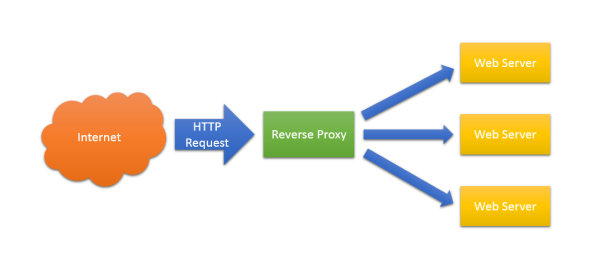
In a previous post I explained some of the benefits of using a reverse proxy. On my current project we’ve building a distributed service oriented architecture that also exposes an HTTP API, and we’re using a reverse proxy to route requests addressed to our API to individual components. We have chosen the excellent Nginx web server to serve as our reverse proxy; it’s fast, reliable and easy to configure. We use it to aggregate multiple services exposing HTTP APIs into a single URL space. So, for example, when you type:

http://api.example.com/product/pinstripe_suit

It gets routed to:

http://10.0.1.101:8001/product/pinstripe_suit

But when you go to:

http://api.example.com/customer/103474783

It gets routed to

http://10.0.1.104:8003/customer/103474783

To the consumer of the API it appears that they are exploring a single URL space (http://api.example.com/blah/blah), but behind the scenes the different top level segments of the URL route to different back end servers. /product/… routes to 10.0.1.101:8001, but /customer/… routes to 10.0.1.104:8003.

We also want this to be self-configuring. So, say I want to create a new component of the system that records stock levels. Rather than extending an existing component, I want to be able to write a stand-alone executable or service that exposes an HTTP endpoint, have it be automatically deployed to one of the hosts in my cloud infrastructure, and have Nginx automatically route requests addressed http://api.example.com/stock/whatever to my new component.

We also want to load balance these back end services. We might want to deploy several instances of our new stock API and have Nginx automatically round robin between them.

We call each top level segment ( /stock, /product, /customer ) a claim. A component publishes an ‘AddApiClaim’ message over RabbitMQ when it comes on line. This message has 3 fields: ‘Claim', ‘ipAddress’, and ‘PortNumber’. We have a special component, ProxyAutomation, that subscribes to these messages and rewrites the Nginx configuration as required. It uses SSH and SCP to log into the Nginx server, transfer the various configuration files, and instruct Nginx to reload its configuration. We use the excellent SSH.NET library to automate this.

A really nice thing about Nginx configuration is wildcard includes. Take a look at our top level configuration file:

   1: ...
   2:  
   3: http {
   4:     include       /etc/nginx/mime.types;
   5:     default_type  application/octet-stream;
   6:  
   7:     log_format  main  '$remote_addr - $remote_user [$time_local] "$request" '
   8:                       '$status $body_bytes_sent "$http_referer" '
   9:                       '"$http_user_agent" "$http_x_forwarded_for"';
  10:  
  11:     access_log  /var/log/nginx/access.log  main;
  12:  
  13:     sendfile        on;
  14:     keepalive_timeout  65;
  15:  
  16:     include /etc/nginx/conf.d/*.conf;
  17: }

Line 16 says, take any *.conf file in the conf.d directory and add it here.

Inside conf.d is a single file for all api.example.com requests:

   1: include     /etc/nginx/conf.d/api.example.com.conf.d/upstream.*.conf;
   2:  
   3: server {
   4:     listen          80;
   5:     server_name     api.example.com;
   6:  
   7:     include         /etc/nginx/conf.d/api.example.com.conf.d/location.*.conf;
   8:  
   9:     location / {
  10:         root    /usr/share/nginx/api.example.com;
  11:         index   index.html index.htm;
  12:     }
  13: }

This is basically saying listen on port 80 for any requests with a host header ‘api.example.com’.

This has two includes. The first one at line 1, I’ll talk about later. At line 7 it says ‘take any file named location.*.conf in the subdirectory ‘api.example.com.conf.d’ and add it to the configuration. Our proxy automation component adds new components (AKA API claims) by dropping new location.*.conf files in this directory. For example, for our stock component it might create a file, ‘location.stock.conf’, like this:

   1: location /stock/ {
   2:     proxy_pass http://stock;
   3: }

This simply tells Nginx to proxy all requests addressed to api.example.com/stock/… to the upstream servers defined at ‘stock’. This is where the other include mentioned above comes in, ‘upstream.*.conf’. The proxy automation component also drops in a file named upstream.stock.conf that looks something like this:

   1: upstream stock {
   2:     server 10.0.0.23:8001;
   3:     server 10.0.0.23:8002;
   4: }

This tells Nginx to round-robin all requests to api.example.com/stock/ to the given sockets. In this example it’s two components on the same machine (10.0.0.23), one on port 8001 and the other on port 8002.

As instances of the stock component get deployed, new entries are added to upstream.stock.conf. Similarly, when components get uninstalled, the entry is removed. When the last entry is removed, the whole file is also deleted.

This infrastructure allows us to decouple infrastructure configuration from component deployment. We can scale the application up and down by simply adding new component instances as required. As a component developer, I don’t need to do any proxy configuration, just make sure my component publishes add and remove API claim messages and I’m good to go.

Thursday, June 13, 2013

NuGet Install Is Broken With F#

There’s a very nasty bug when you try and use NuGet to add a package reference to an F# project. It manifests itself when either the assembly that is being installed also has a version in the GAC or a different version already exists in the output directory.

First let’s reproduce the problem when a version of the assembly already exists in the GAC.

Create a new solution with an F# project.

Choose an assembly that you want to install from NuGet that also exists in the GAC on your machine. For ironic purposes I’m going to choose NuGet.Core for this example.

It’s in my GAC:

D:\>gacutil -l | find "NuGet.Core"
NuGet.Core, Version=1.0.11220.104, Culture=neutral, PublicKeyToken=31bf3856ad364e35, processorArchitecture=MSIL
NuGet.Core, Version=1.6.30117.9648, Culture=neutral, PublicKeyToken=31bf3856ad364e35, processorArchitecture=MSIL

You can see that the highest version in the GAC is version 1.6.30117.9648

Now let’s install NuGet.Core version 2.5.0 from the official NuGet source:

PM> Install-Package NuGet.Core -Version 2.5.0
Installing 'Nuget.Core 2.5.0'.
Successfully installed 'Nuget.Core 2.5.0'.
Adding 'Nuget.Core 2.5.0' to Mike.NuGetExperiments.FsProject.
Successfully added 'Nuget.Core 2.5.0' to Mike.NuGetExperiments.FsProject.

It correctly creates a packages directory, downloads the NuGet.Core package and creates a packages.config file:

D:\Source\Mike.NuGetExperiments\src>tree /F
D:.
│ Mike.NuGetExperiments.sln
│
├───Mike.NuGetExperiments.FsProject
│ │ Mike.NuGetExperiments.FsProject.fsproj
│ │ packages.config
│ │ Spike.fs
│ │
│ ├───bin
│ │ └───Debug
│ │
│ └───obj
│ └───Debug
│
└───packages
│ repositories.config
│
└───Nuget.Core.2.5.0
│ Nuget.Core.2.5.0.nupkg
│ Nuget.Core.2.5.0.nuspec
│
└───lib
└───net40-Client
NuGet.Core.dll

But when when I look at my fsproj file I see that it has incorrectly referenced the NuGet.Core version (1.6.30117.9648) from the GAC and there is no hint path pointing to the downloaded package.

<Reference Include="NuGet.Core, Version=1.6.30117.9648, Culture=neutral, PublicKeyToken=31bf3856ad364e35">
<Private>True</Private>
</Reference>

Next let’s reproduce the problem when a version of an assembly already exists in the output directory.

This time I’m going to EasyNetQ as my example DLL. First I’m going to take a recent version of EasyNetQ.dll, 0.10.1.92 and drop it into to the projects output directory (bin\Debug).

Next use NuGet to install an earlier version of the assembly:

Install-Package EasyNetQ -Version 0.9.2.76
Attempting to resolve dependency 'RabbitMQ.Client (= 3.0.2.0)'.
Attempting to resolve dependency 'Newtonsoft.Json (≥ 4.5)'.
Installing 'RabbitMQ.Client 3.0.2'.
Successfully installed 'RabbitMQ.Client 3.0.2'.
Installing 'Newtonsoft.Json 4.5.11'.
Successfully installed 'Newtonsoft.Json 4.5.11'.
Installing 'EasyNetQ 0.9.2.76'.
Successfully installed 'EasyNetQ 0.9.2.76'.
Adding 'RabbitMQ.Client 3.0.2' to Mike.NuGetExperiments.FsProject.
Successfully added 'RabbitMQ.Client 3.0.2' to Mike.NuGetExperiments.FsProject.
Adding 'Newtonsoft.Json 4.5.11' to Mike.NuGetExperiments.FsProject.
Successfully added 'Newtonsoft.Json 4.5.11' to Mike.NuGetExperiments.FsProject.
Adding 'EasyNetQ 0.9.2.76' to Mike.NuGetExperiments.FsProject.
Successfully added 'EasyNetQ 0.9.2.76' to Mike.NuGetExperiments.FsProject.

NuGet reports that everything went according to plan and that EasyNetQ 0.9.2.76 has been successfully added to my project.

Once again the packages directory was successfully created and the correct version of EasyNetQ has been downloaded. The packages.config file also has the correct version of EasyNetQ. I won’t show you the output from ‘tree’ again, it’s much the same as before.

Again, when I look at my fsproj file the version of EasyNetQ is incorrect, it’s 0.10.1.92, and again there’s no hint path:

<Reference Include="EasyNetQ, Version=0.10.1.92, Culture=neutral, PublicKeyToken=null">
<Private>True</Private>
</Reference>

Yup, NuGet install is most definitely broken with F#.

This bug makes using NuGet and F# together an exercise in frustration. Our team has wasted days attempting to get to the bottom of this.

It seems that it’s a well know problem. Just take a look at this workitem, reported over a year ago:

http://nuget.codeplex.com/workitem/2149

After much cursing of NuGet, the problem actually appears to be with the F# project system rather than with NuGet itself:

“F# knows about this behavior and they will release the fix”

Hmm, it hasn’t been fixed yet.

We had a dig around the NuGet code. The interesting piece is this file snippet (from NuGet.VisualStudio.VsProjectSystem):

   1: public virtual void AddReference(string referencePath, Stream stream)
   2: {
   3:     string name = Path.GetFileNameWithoutExtension(referencePath);
   4:     try
   5:     {
   6:         // Get the full path to the reference
   7:         string fullPath = PathUtility.GetAbsolutePath(Root, referencePath);
   8:         string assemblyPath = fullPath;
   9:  
  10:         ...
  11:  
  12:         // Add a reference to the project
  13:         dynamic reference = Project.Object.References.Add(assemblyPath);
  14:  
  15:         ...
  16:  
  17:         TrySetCopyLocal(reference);
  18:  
  19:         // This happens if the assembly appears in any of the search
  20:         // paths that VS uses to locate assembly references. Most commonly, 
  21:         // it happens if this assembly is in the GAC or in the output path.
  22:         if (!reference.Path.Equals(fullPath, StringComparison.OrdinalIgnoreCase))
  23:         {
  24:             // Get the msbuild project for this project
  25:             MsBuildProject buildProject = Project.AsMSBuildProject();
  26:  
  27:             if (buildProject != null)
  28:             {
  29:                 // Get the assembly name of the reference we are trying to add
  30:                 AssemblyName assemblyName = AssemblyName.GetAssemblyName(fullPath);
  31:  
  32:                 // Try to find the item for the assembly name
  33:                 MsBuildProjectItem item = 
  34:                     (from assemblyReferenceNode in buildProject.GetAssemblyReferences()
  35:                     where AssemblyNamesMatch(assemblyName, assemblyReferenceNode.Item2)
  36:                     select assemblyReferenceNode.Item1).FirstOrDefault();
  37:  
  38:                 if (item != null)
  39:                 {
  40:                     // Add the <HintPath> metadata item as a relative path
  41:                     item.SetMetadataValue("HintPath", referencePath);
  42:  
  43:                     // Save the project after we've modified it.
  44:                     Project.Save();
  45:                 }
  46:             }
  47:         }
  48:     }
  49:     catch (Exception e)
  50:     {
  51:         ...
  52:     }
  53: }

On line 13 NuGet calls out to the F# project system and asks it to add a reference to the assembly at the given path. We assume that the F# project system then does the wrong thing by searching for the assembly name anywhere in the GAC or the output directory rather than referencing the explicit assembly NuGet is asking it to reference.

Interestingly, it looks as if the NuGet team have attempted to code a work-around for this bug from line 22 onwards. Could this be why C# projects don’t exhibit this behaviour? Unfortunately the work around doesn’t work in the F# case. We think it’s because F# doesn’t respect assembly versions and will happily replace any requested assembly with another one so long as it’s got the same simple name. At line 33, no assemblies are found in the fsproj file because the ‘AssemblyNamesMatch’ function does an exact match using all four elements of the full assembly name (simple name, version, culture, and key) and of course the assembly that the F# project system has found and added has a different version.

So, come on F# team, pull your finger out and fix the Visual Studio F# project system. In the meantime, in my next post I’ll talk about some of things our team, and especially the excellent Michael Newton (@mavnn) has been doing to try and work around these problems.

Update: Micheal Newton has written a guest post to explain some of things we are doing to work around these problems.

Wednesday, May 29, 2013

SSH.NET

I’ve recently had the need to automate configuration of Nginx on an Ubuntu server. Of course, in UNIX land we like to use SSH (Secure Shell) to log into our servers and manage them remotely. Wouldn’t it be nice, I thought, if there was a managed SSH library somewhere so that I could automate logging onto my Ubuntu server, run various commands and transfer files. A short Google turned up SSH.NET by the somewhat mysterious Olegkap (at least I couldn’t find out anything else about them) which turned out to be just what I wanted. Here’s the blurb on the CodePlex site:

“This project was inspired by Sharp.SSH library which was ported from java and it seems like was not supported for quite some time. This library is complete rewrite using .NET 4.0, without any third party dependencies and to utilize the parallelism as much as possible to allow best performance I can get.”

It does exactly what it says on the tin. It’s on NuGet, so you can grab it with:

PM> Install-Package SSH.NET

Here’s how you run a remote command. First you need to build a ConnectionInfo object:

public ConnectionInfo CreateConnectionInfo()
{
const string privateKeyFilePath = @"C:\some\private\key.pem";
ConnectionInfo connectionInfo;
using (var stream = new FileStream(privateKeyFilePath, FileMode.Open, FileAccess.Read))
{
var privateKeyFile = new PrivateKeyFile(stream);
AuthenticationMethod authenticationMethod =
new PrivateKeyAuthenticationMethod("ubuntu", privateKeyFile);

connectionInfo = new ConnectionInfo(
"my.server.com",
"ubuntu",
authenticationMethod);
}

return connectionInfo;
}

Then you simply create an SshClient instance and run commands:

public void Connect()
{
using (var ssh = new SshClient(CreateConnectionInfo()))
{
ssh.Connect();
var command = ssh.CreateCommand("uptime");
var result = command.Execute();
Console.Out.WriteLine(result);
ssh.Disconnect();
}
}

Here I’m running the ‘uptime’ command which output this when I ran it just now:

14:37:46 up 22 days,  3:59,  0 users,  load average: 0.08, 0.03, 0.05

To transfer a file, just use the ScpClient:

public void GetConfigurationFiles()
{
using (var scp = new ScpClient(CreateNginxServerConnectionInfo()))
{
scp.Connect();

scp.Download("/etc/nginx/", new DirectoryInfo(@"D:\Temp\ScpDownloadTest"));

scp.Disconnect();
}
}

Which grabs all my Nginx configuration and transfers it to a directory tree on my windows machine.

All in all a very nice little library that’s been working well for me so far. Give it a try if you need to interact with a UNIX-like machine from .NET code.

Friday, May 03, 2013

The Benefits of a Reverse Proxy

A typical ASP.NET public website hosted on IIS is usually configured in such a way that the server that IIS is installed on is visible to the public internet. HTTP requests from a browser or web service client are routed directly to IIS which also hosts the ASP.NET worker process.  All the functionality needed to produce the web site is embodied in a single server. This includes caching, SSL termination, authentication, serving static files and compression. This approach is simple and straightforward for small sites, but is hard to scale, both in terms of performance, and in terms of managing the complexity of a large complex application. This is especially true if you have a distributed service oriented architecture with multiple HTTP endpoints that appear and disappear frequently.

A reverse proxy is server component that sits between the internet and your web servers. It accepts HTTP requests, provides various services, and forwards the requests to one or many servers.

font-side-proxy

Having a point at which you can inspect, transform and route HTTP requests before they reach your web servers provides a whole host of benefits. Here are some:

Load Balancing

This is the reverse proxy function that people are most familiar with. Here the proxy routes incoming HTTP requests to a number of identical web servers. This can work on a simple round-robin basis, or if you have statefull web servers (it’s better not to) there are session-aware load balancers available. It’s such a common function that load balancing reverse proxies are usually just referred to as ‘load balancers’. There are specialized load balancing products available, but many general purpose reverse proxies also provide load balancing functionality.

Security

A reverse proxy can hide the topology and characteristics of your back-end servers by removing the need for direct internet access to them. You can place your reverse proxy in an internet facing DMZ, but hide your web servers inside a non-public subnet.

Authentication

You can use your reverse proxy to provide a single point of authentication for all HTTP requests.

SSL Termination

Here the reverse proxy handles incoming HTTPS connections, decrypting the requests and passing unencrypted requests on to the web servers. This has several benefits:

  • Removes the need to install certificates on many back end web servers.
  • Provides a single point of configuration and management for SSL/TLS
  • Takes the processing load of encrypting/decrypting HTTPS traffic away from web servers.
  • Makes testing and intercepting HTTP requests to individual web servers easier.

Serving Static Content

Not strictly speaking ‘reverse proxying’ as such. Some reverse proxy servers can also act as web servers serving static content. The average web page can often consist of megabytes of static content such as images, CSS files and JavaScript files. By serving these separately you can take considerable load from back end web servers, leaving them free to render dynamic content.

Caching

The reverse proxy can also act as a cache. You can either have a dumb cache that simply expires after a set period, or better still a cache that respects Cache-Control and Expires headers. This can considerably reduce the load on the back-end servers.

Compression

In order to reduce the bandwidth needed for individual requests, the reverse proxy can decompress incoming requests and compress outgoing ones. This reduces the load on the back-end servers that would otherwise have to do the compression, and makes debugging requests to, and responses from, the back-end servers easier.

Centralised Logging and Auditing

Because all HTTP requests are routed through the reverse proxy, it makes an excellent point for logging and auditing.

URL Rewriting

Sometimes the URL scheme that a legacy application presents is not ideal for discovery or search engine optimisation. A reverse proxy can rewrite URLs before passing them on to your back-end servers. For example, a legacy ASP.NET application might have a URL for a product that looks like this:

http://www.myexampleshop.com/products.aspx?productid=1234

You can use a reverse proxy to present a search engine optimised URL instead:

http://www.myexampleshop.com/products/1234/lunar-module

Aggregating Multiple Websites Into the Same URL Space

In a distributed architecture it’s desirable to have different pieces of functionality served by isolated components. A reverse proxy can route different branches of a single URL address space to different internal web servers.

For example, say I’ve got three internal web servers:

http://products.internal.net/
http://orders.internal.net/
http://stock-control.internal.net/

I can route these from a single external domain using my reverse proxy:

http://www.example.com/products/    -> http://products.internal.net/
http://www.example.com/orders/ -> http://orders.internal.net/
http://www.example.com/stock/ -> http://stock-control.internal.net/

To an external customer it appears that they are simply navigating a single website, but internally the organisation is maintaining three entirely separate sites. This approach can work extremely well for web service APIs where the reverse proxy provides a consistent single public facade to an internal distributed component oriented architecture.

So …

So, a reverse proxy can off load much of the infrastructure concerns of a high-volume distributed web application.

We’re currently looking at Nginx for this role. Expect some practical Nginx related posts about how to do some of this stuff in the very near future.

Happy proxying!

Monday, April 22, 2013

Stop Your Console App The Nice Way

When you write a console application, do you simply put

Console.WriteLine("Hit <enter> to end");
Console.ReadLine();

at the end of Main and block on Console.ReadLine()?

It’s much nicer to to make your console application work with Windows command line conventions and exit when the user types Control-C.

The Console class has a static event CancelKeyPress that fires when Ctrl-C is pressed. You can create an AutoResetEvent that blocks until you call Set in the CancelKeyPress handler.

It’s also nice to stop the application from being arbitrarily killed at the point where Ctrl-C is pressed by setting the EventArgs.Cancel property to true. This gives you a chance to complete what you are doing and exit the application cleanly.

Here’s an example. My little console application kicks off a worker thread and then blocks waiting for Ctrl-C as described above. When Ctrl-C is pressed I send a signal to the worker thread telling it to finish what it’s doing and exit.

using System;
using System.Threading;

namespace Mike.Spikes.ConsoleShutdown
{
class Program
{
private static bool cancel = false;

static void Main(string[] args)
{
Console.WriteLine("Application has started. Ctrl-C to end");

// do some cool stuff here
var myThread = new Thread(Worker);
myThread.Start();

var autoResetEvent = new AutoResetEvent(false);
Console.CancelKeyPress += (sender, eventArgs) =>
{
// cancel the cancellation to allow the program to shutdown cleanly
eventArgs.Cancel = true;
autoResetEvent.Set();
};

// main blocks here waiting for ctrl-C
autoResetEvent.WaitOne();
cancel = true;
Console.WriteLine("Now shutting down");
}

private static void Worker()
{
while (!cancel)
{
Console.WriteLine("Worker is working");
Thread.Sleep(1000);
}
Console.WriteLine("Worker thread ending");
}
}
}

Much nicer I think.

Thursday, April 18, 2013

Serializing Lua Coroutines With Pluto

In my last post I showed how it’s possible to use Lua as a distributed workflow scripting language because of its build in support for coroutines. But in order to create viable long-running workflows we have to have some way of saving the script’s state at the point that it pauses; we need a way to serialize the coroutine.

Enter Pluto:

“Pluto is a heavy duty persistence library for Lua. Pluto is a library which allows users to write arbitrarily large portions of the "Lua universe" into a flat file, and later read them back into the same or a different Lua universe.”

I downloaded the Win32 build of Tamed Pluto from here and placed it in a directory alongside my Pluto.dll. You have to tell Lua where to find C libraries by setting the Lua package.cpath:

using (var lua = new Lua())
{
lua["package.cpath"] = @"D:\Source\Mike.DistributedLua\Lua\?.dll";

...
}

Lua can now find the Pluto library and we can import it into our script with:

require('pluto')

Here’s a script which defines a function foo which calls a function bar. Foo is used to create a coroutine. Inside bar the coroutine yields. The script uses Pluto to serialize the yielded coroutine and saves it to a file.

-- import pluto, print out the version number 
-- and set non-human binary serialization scheme.
require('pluto')
print('pluto version '..pluto.version())
pluto.human(false)

-- perms are items to be substituted at serialization
perms = { [coroutine.yield] = 1 }

-- the functions that we want to execute as a coroutine
function foo()
local someMessage = 'And hello from a long dead variable!'
local i = 4
bar(someMessage)
print(i)
end

function bar(msg)
print('entered bar')
-- bar runs to here then yields
coroutine.yield()
print(msg)
end

-- create and start the coroutine
co = coroutine.create(foo)
coroutine.resume(co)

-- the coroutine has now stopped at yield. so we can
-- persist its state with pluto
buf = pluto.persist(perms, co)

-- save the serialized state to a file
outfile = io.open(persistCRPath, 'wb')
outfile:write(buf)
outfile:close()

This next script loads the serialized coroutine from disk, deserializes it, and runs it from the point that it yielded:

-- import pluto, print out the version number 
-- and set non-human binary serialization scheme.
require('pluto')
print('pluto version '..pluto.version())
pluto.human(false)

-- perms are items to be substituted at serialization
-- (reverse the key/value pair that you used to serialize)
perms = { [1] = coroutine.yield }

-- get the serialized coroutine from disk
infile, err = io.open(persistCRPath, 'rb')
if infile == nil then
error('While opening: ' .. (err or 'no error'))
end

buf, err = infile:read('*a')
if buf == nil then
error('While reading: ' .. (err or 'no error'))
end

infile:close()

-- deserialize it
co = pluto.unpersist(perms, buf)

-- and run it
coroutine.resume(co)

When we run the scripts, the first prints out ‘entered bar’ and then yields:

LUA> pluto version Tamed Pluto 1.0
LUA> entered bar

The second script loads the paused ‘foo’ and ‘bar’ and continues from the yield:

LUA> pluto version Tamed Pluto 1.0
LUA> And hello from a long dead variable!
LUA> 4

Having the ability to run a script to the point at which it starts a long running call, serialize its state and store it somewhere, then pick up that serialized state and resume it at another place and time is a very powerful capability. It means we can write simple procedural scripts for our workflows, but have them execute over a distributed service oriented architecture.

The complete code for this experiment is on GitHub here.

Thursday, April 04, 2013

Lua as a Distributed Workflow Scripting Language

I’ve been spending a lot of time recently thinking about ways of orchestrating long running workflows in a service oriented architecture. I was talking this over at last Tuesday’s Brighton ALT NET when Jay Kannan, who’s a game developer amongst other things, mentioned that Lua is a popular choice for scripting game platforms. Maybe I should check it out. So I did. And it turns out to be very interesting.

If you haven’t heard of Lua, it’s a “powerful, fast, lightweight, embeddable scripting language” originally conceived by a team at the Catholic University of Rio de Janeiro in Brazil. It’s the leading scripting language for game platforms and also pops up in other interesting locations including Photoshop and Wikipedia. It’s got a straightforward C API that makes it relatively simple to p-invoke from .NET, and indeed there’s a LuaInterface library that provides a managed API.

I got the source code from the Google code svn repository and built it in VS 2012, but there are NuGet packages available as well.

It turned out to be very simple to use Lua to script a distributed workflow. Lua has first class coroutines which means that you can pause and continue a Lua script at will. The LuaInterface library allows you inject C# functions and call them as Lua functions, so it’s simply a case of calling an asynchronous C# ‘begin’ function, suspending the script by yielding the coroutine, waiting for the asynchronous function to return, setting the return value, and starting up the script again.

Let me show you how.

First here’s a little Lua script:

a = 5
b = 6

print('doing remote add ...')

r1 = remoteAdd(a, b)

print('doing remote multiply ...')

r2 = remoteMultiply(r1, 4)

print('doing remote divide ...')

r3 = remoteDivide(r2, 2)

print(r3)

The three functions ‘remoteAdd’, ‘remoteMultiply’ and ‘remoteDivide’ are all asynchronous. Behind the scenes a message is sent via RabbitMQ to a remote OperationServer where the calculation is carried out and a message is returned.

The script runs in my LuaRuntime class. This creates and sets up the Lua environment that the script runs in:

public class LuaRuntime : IDisposable
{
private readonly Lua lua = new Lua();
private readonly Functions functions = new Functions();

public LuaRuntime()
{
lua.RegisterFunction("print", functions, typeof(Functions).GetMethod("Print"));
lua.RegisterFunction("startOperation", this, GetType().GetMethod("StartOperation"));

lua.DoString(
@"
function remoteAdd(a, b) return remoteOperation(a, b, '+'); end
function remoteMultiply(a, b) return remoteOperation(a, b, '*'); end
function remoteDivide(a, b) return remoteOperation(a, b, '/'); end

function remoteOperation(a, b, op)
startOperation(a, b, op)
local cor = coroutine.running()
coroutine.yield(cor)

return LUA_RUNTIME_OPERATION_RESULT
end
"
);
}

public void StartOperation(int a, int b, string operation)
{
functions.RunOperation(a, b, operation, result =>
{
lua["LUA_RUNTIME_OPERATION_RESULT"] = result;
lua.DoString("coroutine.resume(co)");
});
}

public void Execute(string script)
{
const string coroutineWrapper =
@"co = coroutine.create(function()
{0}
end)"
;
lua.DoString(string.Format(coroutineWrapper, script));
lua.DoString("coroutine.resume(co)");
}

public void Dispose()
{
lua.Dispose();
functions.Dispose();
}
}

When this class is instantiated it creates a new LuaInterface environment (the Lua class) and a new instance of a Functions class that I’ll explain below.

The constructor is where most of the interesting setup happens. First we register two C# functions that we want to call from inside Lua: ‘print’ which simply prints from the console, and ‘startOperation’ which starts an asynchronous math operation.

Next we define our three functions: ‘remoteAdd’, ‘remoteMultiply’ and ‘remoteDivide’ which all in turn invoke a common function ‘remoteOperation’. RemoteOperation calls the registered C# function ‘startOperation’ then yields the currently running coroutine. Effectively the script will stop here until it’s started again. After it starts, the result of the asynchronous operation is accessed from the  LUA_RUNTIME_OPERATION_RESULT variable and returned to the caller.

The C# function StartOperation calls RunOperation on our Functions class which has an asynchronous callback. In the callback we set the result value in the Lua environment and execute ‘coroutine.resume’ which restarts the Lua script at the point where it yielded.

The Execute function actually runs the script. First it embeds it in a ‘coroutine.create’ call so that the entire script is created as a coroutine, then it simply starts the coroutine by calling ‘coroutine.resume’.

The Functions class is just a wrapper around a function that maintains an EasyNetQ connection to RabbitMQ and makes an EasyNetQ request to a remote server somewhere else on the network.

public class Functions : IDisposable
{
private readonly IBus bus;

public Functions()
{
bus = RabbitHutch.CreateBus("host=localhost");
}

public void Dispose()
{
bus.Dispose();
}

public void RunOperation(int a, int b, string operation, Action<int> resultCallback)
{
using (var channel = bus.OpenPublishChannel())
{
var request = new OperationRequest()
{
A = a,
B = b,
Operation = operation
};
channel.Request<OperationRequest, OperationResponse>(request, response =>
{
Console.WriteLine("Got response {0}", response.Result);
resultCallback(response.Result);
});
}
}

public void Print(string msg)
{
Console.WriteLine("LUA> {0}", msg);
}
}
 
Here’s a sample run of the script:
 
DEBUG: Trying to connect
DEBUG: OnConnected event fired
INFO: Connected to RabbitMQ. Broker: 'localhost', Port: 5672, VHost: '/'
LUA> doing remote add ...
DEBUG: Declared Consumer. queue='easynetq.response.143441ff-3635-4d5d-8e42-6b379b3f8356', prefetchcount=50
DEBUG: Published to exchange: 'easy_net_q_rpc', routing key: 'Mike_DistributedLua_Messages_OperationRequest:Mike_DistributedLua_Messages', correlationId: '50560dd9-2be1-49a1-96f6-9c62641080ae'
DEBUG: Recieved
RoutingKey: 'easynetq.response.143441ff-3635-4d5d-8e42-6b379b3f8356'
CorrelationId: '50560dd9-2be1-49a1-96f6-9c62641080ae'
ConsumerTag: '101343d9-9497-4893-88e6-b89cc1de29a4'
Got response 11
LUA> doing remote multiply ...
DEBUG: Declared Consumer. queue='easynetq.response.f571f6d7-b963-4a88-bf62-f05785009e39', prefetchcount=50
DEBUG: Published to exchange: 'easy_net_q_rpc', routing key: 'Mike_DistributedLua_Messages_OperationRequest:Mike_DistributedLua_Messages', correlationId: '0ea7e1c3-6f12-4cb9-a861-2f5de8f2600d'
DEBUG: Model Shutdown for queue: 'easynetq.response.143441ff-3635-4d5d-8e42-6b379b3f8356'
DEBUG: Recieved
RoutingKey: 'easynetq.response.f571f6d7-b963-4a88-bf62-f05785009e39'
CorrelationId: '0ea7e1c3-6f12-4cb9-a861-2f5de8f2600d'
ConsumerTag: '2c35f24e-7745-4475-885a-d214a1446a70'
Got response 44
LUA> doing remote divide ...
DEBUG: Declared Consumer. queue='easynetq.response.060f7882-685c-4b00-a930-aa4f20f7c057', prefetchcount=50
DEBUG: Published to exchange: 'easy_net_q_rpc', routing key: 'Mike_DistributedLua_Messages_OperationRequest:Mike_DistributedLua_Messages', correlationId: 'ea9a90cc-cd7d-4f05-b171-c6849026ac4a'
DEBUG: Model Shutdown for queue: 'easynetq.response.f571f6d7-b963-4a88-bf62-f05785009e39'
DEBUG: Recieved
RoutingKey: 'easynetq.response.060f7882-685c-4b00-a930-aa4f20f7c057'
CorrelationId: 'ea9a90cc-cd7d-4f05-b171-c6849026ac4a'
ConsumerTag: '90e6b024-c5c4-440a-abdf-cb9a000c131c'
Got response 22
LUA> 22
DEBUG: Model Shutdown for queue: 'easynetq.response.060f7882-685c-4b00-a930-aa4f20f7c057'
Completed
DEBUG: Connection disposed

You can see the Lua print statements interleaved with EasyNetQ DEBUG statements showing the messages being published and consumed.
 
So there you go, a distributed workflow scripting engine in under 100 lines of code. All I’ve got to do now is serialize the Lua environment at each yield and then restart it again from its serialized state. This is possible according to a bit of googling yesterday afternoon. Watch this space.
 
You can find the code for all this on GitHub here:
 

Tuesday, March 05, 2013

Coders, Musicians and Cooks

In a light hearted Twitter exchange yesterday I asked why so many coders also played guitar. Mark Seemann suggested that there was also a high correlation with cooking.

code_play_cook_tweet

How about a survey? Mark and I have over 4000 twitter followers between us so I was sure we could get a few of them to click a few radio buttons, with no promise of reward, but with the warm feeling that they were helping to progress the anthropological understanding of the coding tribe. So I created a survey and waited for the results to stream in. Of course, as Rob Pickering pointed out, this kind of self selecting survey is very unscientific, but fun nonetheless.

What have we learnt?

  1. It is ridiculously easy to create an online survey using Google Drive. Just click ‘new form’, type in a few questions, and Bob’s yer uncle. It automatically builds a nice summary graphic on the fly as the survey progresses (see below).
  2. Most of Mark and I’s followers are C# coders. 81%. That’s not really surprising.
  3. More coders cook than play musical instruments: 85% verses 53%. That’s not really surprising either. I expect if you took a survey of the general population you’d find quite a high percentage who cook verses those who play.
  4. Guitar is by far the most popular instrument among coders. 30% play guitar. This confirms my hunch, but doesn’t answer my question – why it’s such a high percentage.

Here is the Google Drive graphic of the results.

code_play_cook_survey

Wednesday, February 27, 2013

Fractured Product Syndrome

How do you sell your software product? Do you fork the source code of your previous customer, modify it a little and deploy it as its own instance with its own database? Maybe each customer even has their own server? Their own set of servers?

You are suffering from the Fractured Product Syndrome.

Let me tell you a story.

Colin and Alex have a little web development consultancy, called Coaltech (get it?) they are pretty handy with ASP.NET and SQL Server and already had a respectable list of satisfied clients when a local car hire company, Easy Wheels, asked them if they could build them a car booking system. It would keep a list of Easy Wheels’ cars and allow customers to view them and book them online.

Colin and Alex signed a contract with Easy Wheels and got busy. Their “just do it” attitude to getting features done meant that the code wasn’t particularly beautiful, but it did the job and after a couple of months work the system went live. Easy Wheels were very happy with their new system, so happy in fact that they started to tell other independent car rental companies about it. A few months later Colin and Alex got a call from Hire My Ride. They loved what Coaltech had done for Easy Wheels and wanted a similar system. Of course it would have to be redesigned to fit in with Hire My Ride’s branding, but the basic functionality was pretty much identical. Colin and Alex did the obvious thing, they took a copy of the Easy Wheels code and tweaked it for Hire My Ride. Of course they charged the same bespoke software price for Hire My Ride’s system.

Soon a third and fourth car hire company had asked Coaltech for their ‘system’. Each time Colin and Alex took a copy of the last customer’s code – it made sense to take the most recent code because they inevitably added a few refinements with each customer – and then they altered it to match the new customer’s requirements. Before long they had arranged a deal with another web agency to take over all their non-car-hire work and decided to concentrate full time on the ‘system’. It needed a name too, they couldn’t carry on calling it ‘Easy Wheels’ and they certainly couldn’t market it like that. Soon it became ‘Coaltech Cars’ with a new marketing website. They also found that they couldn’t keep up with demand with just the two of them doing customer implementations. Each new customer took around six weeks of development work with the inevitable to-and-fro of slightly different requirements and design changes. To help meet demand they started to hire developers. First Jez, then Dave, then Neville. They all modified the software in slightly different ways, but it didn’t seem to matter at the time.

Fast forward five years. Coaltech now has 50 employees and around 50 customers. It’s fair to say that they are the leading vendor of independent car rental management systems. The majority of their staff are developers, although they also have a small sales, HR and customer relationship management team. You would have thought that Colin and Alex would be happy to have turned their little web development company into such a success, but instead life just seemed to be one long headache. Although the company had grown, it always seemed hard to turn a profit. As it was customers often balked at the price of the system. The same bug would turn up again and again for different customers. There never seemed to be enough time to fix them all. Even though they might have delivered a new feature for one client, it always seemed to take just as long to implement it for another; sometimes longer depending on what code they’d been forked from. The small team that looked after the servers were in constant fire fighting mode and got very upset when anyone suggested ‘upgrading’ any of the clients -  it always meant bugs, downtime and screaming customers. And then the government changed the Value Added Tax rate. Colin had to cancel his holiday and they lost two of their best developers after several weeks of late nights and no weekends while they updated and redeployed 50 separate web applications.

The end for Coaltech cars came slowly and painfully. Alex had the first hint of it when he was made aware of a little company called RentBoy. They had a little software-as-a-service product for small car hire companies. To use it you entered your credit card number, a logo, a few other details, and you were good to go. They weren’t any immediate competition for Coaltech Cars, having only a small subset of the features, but they soon captured the low end of the market, the one or two man band car companies that had never been able to afford Coaltech’s sign up or licensing fees.

But then the features started coming thick and fast and soon Coaltech found they were loosing out to RentBoy when bidding for clients. Colin found an article on the High Scalability blog about RentBoy’s architecture. They had a single scalable application that served all their customers, one place to fix bugs, one point of scalability and maintenance. They practiced continuous deployment allowing them to quickly build and release new features for all their customers. The company had four employees and already more customers than Coaltech. They charged about a tenth of Coaltech’s fees.

Coaltech’s new client revenues soon dried up. They’d always made a certain amount of money from sign-up fees. Too late they realised that they had to start shedding staff, always a painful thing for a small closely knit company. The debts mounted until the bank would no longer support them, and before long they had to declare bankruptcy. Luckily Colin and Alex managed to get jobs as project managers in enterprise development teams.

The moral of the story? Try to avoid Fractured Product Syndrome if you possibly can. Although simply forking the source code for each new customer appears by far the easiest thing to do at the start, it simply doesn’t scale. Start thinking about how to build multi-tenanted software-as-a-service long before you get to where Coaltech got to. Learn to say ‘no’ to customers if you have to. It’s far better to have a high number of low value customers than smaller numbers of higher value ones on a differentiated platform. It’s much easier for a low-value volume software provider to move into the high-value space than for a high-value provider to move down.

Learn to recognise Fractured Product Syndrome and address it before it gets serious!