Friday, May 04, 2012

How Do I Detect When A Client Thread Exits? Make The Client Tell You.

Yesterday I asked the LazyWeb for some help: how does library code detect then a client thread that has called one of its methods exits? There followed a very useful discussion on Stack Overflow. I’ve been persuaded by Martin James’ arguments that however one tries to do it, there will always be scenarios where the result won’t be optimal. The answer is for the client to tell the library explicitly when it’s finished its work.

“'it just works' solutions just don't <g>. Whidows, Linux, every OS I've ever used has a 'token', 'handle' or other such object as the solution to maintaining state across calls. Using inplicit thread-local data and polling for thread termination etc. will suck the life out of your library”

OK, so I  buy the argument, but what’s the best way to change the API so that the client can indicate that it’s finished its work?

First alternative.

Provide a method that returns a worker that implements IDisposable and make it clear in the documentation that you should not share workers between threads. Here's the modified library:

public class Library
{
public LibraryWorker GetLibraryWorker()
{
return new LibraryWorker();
}
}

public class LibraryWorker : IDisposable
{
public void StartSomething()
{
Console.WriteLine("Library says: StartSomething called");
}

public void Dispose()
{
Console.WriteLine("Library says: I can clean up");
}
}

The client is now a little more complicated:

public class Client
{
private readonly Library library;

public Client(Library library)
{
this.library = library;
}

public void DoWorkInAThread()
{
var thread = new Thread(() =>
{
using(var worker = library.GetLibraryWorker())
{
worker.StartSomething();
Console.WriteLine("Client thread says: I'm done");
}
});
thread.Start();
}
}

The main problem with this change is that it's a breaking change for the API. Existing clients will have to be re-written. Now that's not such a bad thing, it would mean revisiting them and making sure they are cleaning up correctly.

Non-breaking second alternative.

The API provides a way for the client to declare 'work scope'. Once the scope completes, the library can clean up. The library provides a WorkScope that implements IDisposable, but unlike the first alternative above, the StartSomething method stays on the Library class:

public class Library
{
public WorkScope GetWorkScope()
{
return new WorkScope();
}

public void StartSomething()
{
Console.WriteLine("Library says: StartSomething called");
}
}

public class WorkScope : IDisposable
{
public void Dispose()
{
Console.WriteLine("Library says: I can clean up");
}
}

The client simply puts the StartSomething call in a WorkScope...

public class Client
{
private readonly Library library;

public Client(Library library)
{
this.library = library;
}

public void DoWorkInAThread()
{
var thread = new Thread(() =>
{
using(library.GetWorkScope())
{
library.StartSomething();
Console.WriteLine("Client thread says: I'm done");
}
});
thread.Start();
}
}

I like this less than the first alternative because it doesn't force the library user to think about scope. What do you think?

Thursday, May 03, 2012

Help! How Do I Detect When a Client Thread Exits?

Here’s an interesting library writer’s dilemma. In my library (in my case EasyNetQ) I’m assigning thread local resources. So when a client creates a new thread and then calls certain methods on my library new resources get created. In the case of EasyNetQ a new channel to the RabbitMQ server is created when the client calls ‘Publish’ on a new thread. I want to be able to detect when the client thread exits so that I can clean up the resources (channels).

The only way of doing this I’ve come up with is to create a new ‘watcher’ thread that simply blocks on a Join call to the client thread. Here a simple demonstration:

First my ‘library’. It grabs the client thread and then creates a new thread which blocks on ‘Join’:

public class Library
{
public void StartSomething()
{
Console.WriteLine("Library says: StartSomething called");

var clientThread = Thread.CurrentThread;
var exitMonitorThread = new Thread(() =>
{
clientThread.Join();
Console.WriteLine("Libaray says: Client thread existed");
});

exitMonitorThread.Start();
}
}

Here’s a client that uses my library. It creates a new thread and then calls my library’s StartSomething method:

public class Client
{
private readonly Library library;

public Client(Library library)
{
this.library = library;
}

public void DoWorkInAThread()
{
var thread = new Thread(() =>
{
library.StartSomething();
Thread.Sleep(10);
Console.WriteLine("Client thread says: I'm done");
});
thread.Start();
}
}

When I run the client like this:

var client = new Client(new Library());

client.DoWorkInAThread();

// give the client thread time to complete
Thread.Sleep(100);

I get this output:

Library says: StartSomething called
Client thread says: I'm done
Libaray says: Client thread existed

The thing is, I really don’t like the idea of all these blocked watcher threads hanging around. Is there a better way of doing this?

EasyNetQ: Topic Based Routing

EasyNetQ is my simple .NET API for RabbitMQ. I’ve just added a new feature, Topic based routing. It’s very cool.

Topic based routing is a RabbitMQ feature that allows a subscriber to filter messages based on multiple criteria. A topic is a list of words delimited by dots that are published along with the message. Examples would be, "stock.usd.nyse" or "book.uk.london" or "a.b.c", the words can be anything you like, but would usually be some attributes of the message. The topic string has a limit of 255 characters.

To publish with a topic, simply use the overloaded Publish method:

bus.Publish("X.A", message);

Subscribers can filter messages by specifying a topic to match to. These can include the wildcard characters:

* (star) to match to exactly one word.

# (hash) to match to zero or more words.

So a message that is published with the topic "X.A.2" would match "#", "X.#", "*.A.*" but not "X.B.*" or "A". To subscribe with a topic, use the overloaded Subscribe method:

bus.Subscribe("my_id", "X.*", handler);

A warning. Two separate subscriptions with the same subscriberId but different topic strings probably will not have the effect you are expecting. A subscriberId effectively identifies an individual AMQP queue. Two subscribers with the same subscriptionId will both connect to the same queue and both will add their own topic. So, for example, if you do this:

bus.Subscribe("my_id", "X.*", handler);
bus.Subscribe("my_id", "*.B", handler);

Each handler will be round-robbin’d with any messages that match "X.*" or "*.B".

Now, if you want to match on multiple topics ("X.*" OR "*.B") you can use another overload of the Subscribe method that takes multiple topics, like this:

bus.Subscribe("my_id", new[]{"X.*", "*.B"}, handler);

There are topic overloads for the SubscribeAsync method that work in exactly the same way.

Thursday, April 26, 2012

The Database As Queue Anti-Pattern

“When all you have is a hammer, every problem looks like a nail.”

When all you know is SQL Server, it’s tempting to try and solve every problem with a relational database, but often it’s not the best tool for the job. Today I want to introduce you to an excellent example of this, the ‘Database As Queue’ anti-pattern. It’s a common specimen that you’ll find in the wild in many enterprise development shops.

It works like this: Usually there’s a piece of data that needs to be processed through some workflow, often by a number of different applications or processes.

Database_as_queue

There’s usually a table with some data and a status column. Each process is designed to process data at a particular status. Process 1 in this example inserts records with the status ‘New’, Process 2 picks up ‘New’ records and updates the status to ‘P2 Complete’, Process 3 picks up ‘P2 Complete’ records… you get the picture.

When I say ‘picks up’, what I mean is that each process sits there polling the database at some interval running a select statement something like this:

SELECT * FROM MyWorkflow WHERE Status = 'New'

Why is it an anti-pattern?

Firstly, there’s the polling. Either you have a short interval and hammer your database into submission, or you have a long interval and even the fastest route through your system is the sum of all the (long) intervals.

Secondly there’s the fact that SQL Server is very efficient at insertions, or updates, or queries, but rarely all three on the same table. To make the polling queries perform, you need to put an index on the status, but indexes make for slow inserts. Locks can become a major problem.

Thirdly there’s the issue of how you clear records once the workflow is complete. If you don’t clear the table down at intervals, it will keep growing until it starts to hit the performances of your queries and eventually become a serious operations problem. The problem is, deletes are inefficient on SQL Server.

Fourthly, sharing a database between applications (or services) is a bad thing. It’s just too tempting to put amorphous shared state in there and before you know it you’ll have a hugely coupled monster.

So what should I do?

Simple, use the right tool for the job: this scenario is crying out for a messaging system. It solves all the problems described above; no more polling, efficient message delivery, no need to clear completed messages from queues, and no shared state.

Tuesday, April 24, 2012

A Useful Linq Extension Method: Intersperse

Have you ever had a case where you want to insert a constant item in-between each element of a list of items? For example, if I’ve got a list of numbers:

1,2,3,4,5

And I want to insert 0 between each one to get:

1,0,2,0,3,0,4,0,5

Meet my friend Intersperse (stolen from Haskell, if you hadn’t guessed):

var items = new[] {1, 2, 3, 4, 5}.Intersperse(0).ToArray();

foreach (var item in items)
{
Console.Write(item);
}

This code outputs:

102030405

And here is the Intersperse extension method:

public static IEnumerable<T> Intersperse<T>(this IEnumerable<T> items, T separator)
{
var first = true;
foreach (var item in items)
{
if (first) first = false;
else
{
yield return separator;
}
yield return item;
}
}

Some interesting uses. System.String is, of course, an array of char, so you can do this:

var doubleSpaced = new string("hello world".Intersperse(' ').ToArray());
Console.WriteLine(doubleSpaced);
// outputs 'h e l l o w o r l d'

Or how about this perennial problem, creating a comma separated list:

var strings = new[] {"one", "two", "three"};
var commaSeprated = new string(strings.Intersperse(",").Concat().ToArray());
Console.WriteLine(commaSeprated);
// outputs one,two,three

Tuesday, September 27, 2011

Some Thoughts On Service Oriented Architecture (Part 2)

I’ve been writing a high-level ‘architectural vision’ document for my current clients. I thought it might be nice to republish bits of it here. This is part 2. The first part is here.

My Client has a core product that is heavily customised for each customer. In this post we look at the different kinds of components that make up this architecture. How some are common services that any make up the core product, and how other components might be bespoke pieces for a particular customer. We also examine the difference between workflow, services and endpoints.

It is very important that we make a clear distinction between components that we write as part of the product and bespoke components that we write for a particular customer. We should not put customer specific code into product components and we should not replicate common product code in customer specific pieces.

Because we are favouring small single-purpose components over large multi-purpose monolithic applications, it should be easy for us to differentiate between product and customer pieces.

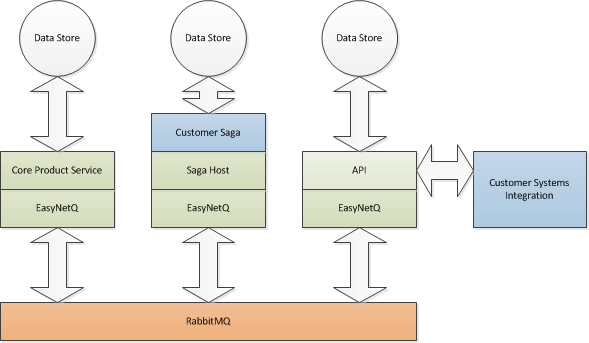
There are three main kinds of components that make up a working system. Services, workflow and endpoints. The diagram below shows how they communicate via EasyNetQ, our open-source infrastructure layer. The green parts are product pieces. The blue parts are bespoke customer specific pieces.
image

Services

Services are components that implement a piece of the core product. An example of a service is a component called Renderer that takes templates and data and does a kind of mail-merge. Because Renderer is a service it should never contain any client specific code. Of course customer requirements might mean that enhancements need to be made to Renderer, but these enhancements should always be done with the understanding that Renderer is part of the product. We should be able to deploy the enhanced Renderer to all our customers without the enhancement affecting them.

Services (in fact all components) should maintain their own state using a service specific database. This database should not be shared with other services. The service should communicate via EasyNetQ with other services and not use a shared database as a back-channel. In the case of an updated Renderer, templates would be stored in Renderer’s local database. Any new or updated templates would arrive as messages via EasyNetQ. Each data item to be rendered would also arrive as a message, and once the data has been rendered, the document should also be published via EasyNetQ.

The core point here is that each service should have a clear API, defined by the message types that it subscribes to and publishes. We should be able to fully exercise a component via messages independently of other services. Because the service’s database is only used by the service, we should be able to flexibly modify its schema in response to changing requirements, without having to worry about the impact that will have on other parts of the system.

It’s important that services do not implement workflow. As we’ll see in the next section, a core feature of this architecture is that workflow and services are separate. Render, for example, should not make decisions about what happens to a document after it is rendered, or implement batching logic. These are separate concerns.

Workflow

Workflow components are customer specific components that describe what happens in response to a specific business trigger. They also implement customer specific business rules. For an airline, an example would be workflow that is triggered by a flight event, say a delay. When the component receives the delay message, it might first retrieve the manifest for the flight by sending a request to a manifest service, then render a message telling each passenger about the delay by sending a render request to renderer, then finally send that message by email by publishing an email request. It would typically implement business rules describing when a delay is considered important etc.

By separating workflow from services, we can flexibly implement customer requirements by creating custom workflows without having to customise our services. We can deliver bespoke customer solutions on a common product platform.

We call these workflow pieces, ‘Sagas’, this is a commonly used term in the industry for a long-running business process. Because sagas all need a common infrastructure for hosting, EasyNetQ includes a ‘SagaHost’. SagaHost is a Windows service that hosts sagas, just like it says on the box. This means that the sagas themselves are written as simple assemblies that can be xcopy deployed.

Sagas will usually require a database to store their state. Once again, this should be saga specific and not a database shared by other services. However a single customer workflow might well consist of several distinct sagas, it makes sense for these to be thought of as a unit. These may well share a single database.

Endpoints

Endpoints are components that communicate with the outside world. They are a bridge between our internal AMQP messaging infrastructure and our external HTTP API. The only way into and out of our product should be via this API. We want to be able to integrate with diverse customer systems, but these integration pieces should be implemented as bridges between the customer system and our official API, rather than as bespoke pieces that publish or subscribe directly to the message bus.

Endpoints come in two flavours, externally triggered and internally triggered. An externally triggered endpoint is where communication is initiated by the customer. An example of this would be flight event. These components are best implemented as web services that simply wait to be called and then publish an appropriate message using EasyNetQ.

An internally triggered endpoint is where communication is triggered by an internal event. An example of this would be the completion of a workflow with the final step being an update of a customer system. The API would be implemented as a Windows Service that subscribes to the update message using EasyNetQ and implements an HTTP client that makes a web service request to a configured endpoint.

The Importance of Testability

A core requirement for any component is that it should be testable. It should be possible to test Services and Workflow (Sagas) simply by sending them messages and checking that they respond with the correct messages. Because ‘back-channel’ communication, especially via shared databases, is not allowed we can treat these components as black-boxes that always respond with the same output to the same input.

Endpoints are slightly more complicated to test. It should be possible to send an externally triggered endpoint a request and watch for the message that’s published. An internally triggered endpoint should make a web request when it receives the correct message.

Developers should provide automated tests to QA for any modification to a component.

Monday, September 26, 2011

Some Thoughts On Service Oriented Architecture

I’ve been writing a high-level ‘architectural vision’ document for my current clients. I thought it might be nice to republish bits of it here. This is the section that makes a justification a service oriented architecture based on messaging.

I’ve taken out anything client-specific.

SOA is one of those snake-oil consultancy terms that seem to mean different things depending on who you talk to. My own views on SOA have been formed from three main sources. Firstly there’s the bible on SOA, Hohpe & Woolf’s Enterprise Integration Patterns. This really is essential reading for anyone attempting to get systems to work together. Next there’s the work of Udi Dahan. He the author of the excellent NServiceBus messaging framework for .NET. I’ve attended his course, and his blog is a fantastic mine of knowledge on all things SOA. Lastly there is the fantastic series of blog posts by Bill Poole on SOA. Just check JBOWS is Bad for a taster.

So what is SOA? Software has a complexity problem. There appears to be a geometric relationship between the complexity of a monolithic system and its stability and maintainability. So a system that is twice as complex as another one will be maybe four times more expensive to maintain and a quarter as stable. There is also the human and organisational side of software. Individual teams tend to build or buy their own solutions. The organisation then needs to find ways for these disparate systems to share information and workflow. Small single purpose systems are always a better choice than large monolithic ones. If we build our systems as components, we can build and maintain them independently. SOA is a set of design patterns that guide us in building and integrating these mini-application pieces.

What is a component?

A component in SOA terms is very different from a component in Object-Oriented terms. A component in OO terms is a logical component that is not independently compiled and deployed. A component or ‘service’ in SOA is a physical component that is an independently built and deployed stand-alone application. It is usually designed as a Windows service or possibly as a web service or an executable. It may or may not have a UI, but it will have some mechanism to communicate with other services.

Each component/service should have the following characteristics:

  • Encapsulated. The service should not share its internal state with the outside world. The most common way people break this rule is by having services share a single database. The service should only change state in response to input from its public interface.
  • Contract. The service should have a clear contract with the outside world. Typically this will be a web-service API and/or the message types that it publishes and consumes.
  • Single Purpose. A component should have one job within the system as a whole. Rendering PDFs for example.
  • Context Free. A component should not be dependent on other components, it should only depend on contracts. For example, if my business process component relies on getting a flight manifest from somewhere, it should simply be able to publish a flight manifest request, it shouldn’t expect a specific flight manifest service to be present.
  • Independently deployable. I should be able to deploy the component/service independently.
  • Independently testable. It should be possible to test the service in isolation without having other services in the system running.

How do components communicate?

Now that we’ve defined the characteristics of a component in our SOA, the next challenge is to select the technology and patterns that they use to communicate with each other. We can list the things that we want from our communication technology:

  • Components should only be able to communicate via a well defined contract - logically-decoupled. They should not be able to dip into each other’s internal state.
  • Components should not have to be configured to communicate with specific endpoints – decoupled configuration. It should be possible to deploy a new service without having to reconfigure the services that it talks to.
  • The communication technology should support ‘temporal-decoupling’. This means that all the services do not have to be running at the same time for the system to work.
  • The communication should be low latency. There should be a minimal delay between a component sending a message and the consumer receiving it.
  • The communication should be based on open standards.

Let’s consider how some common communication technologies meet these criteria…

  logically decoupled decoupled configuration temporal decoupling low latency open standards
File Transfer yes yes yes no yes
Shared Database no yes yes no no
RPC (remoting COM+) yes no no yes no
SOAP Web Services yes no no yes yes
Message Queue (MSMQ) yes no yes yes no
Pub/Sub Messaging (AMQP) yes yes yes yes yes


From the table we can see that there’s only one technology that ticks all our boxes, and that is pub/sub messaging based on an open standard like AMQP. AMQP is a bit like HTTP for messaging, an open wire-level protocol for brokers and their clients. The leading AMQP implementation is RabbitMQ, and this is technology we’ve chosen as our core messaging platform.

There is a caveat however. For communicating with external clients and their systems, building endpoints with open-standards outweighs all other considerations. Now AMQP is indeed an open standard, but it’s a relatively new one that’s only supported by a handful of products. To be confident that we can interoperate with a wide variety of 3rd party systems over the internet we need a ubiquitous technology, so for all external communication we will use HTTP based web-services.

So, AMQP internally, HTTP externally.

Wednesday, September 14, 2011

Thoughts on Windows 8 (part 2)

Back in June I wrote some thoughts on Windows 8 after the initial announcement. Now that we’ve got more details from the Build conference, I thought I’d do a little update.

Microsoft have climbed down and made a significant concession to WPF/Silverlight/.NET devs. Gone is the previous message that Metro applications will only be written in HTML/Javascript, developers can now choose which technology they want to use on the new platform. There still seems to be a bias towards HTML/Javascript judging my the number of sessions on each however, and it seems like MS would prefer developers to go down the HTML/Javascript route. How much this double headed personality effects the development experience is yet to be seen.

Somebody high up in MS must have banged some heads together to get the Windows and Developer Divisions talking to each other. They'd become two opposing camps after the fallout from the failed Vista WinFX experiment. Now Windows is forced to support XAML/.NET and Dev-Division arm-wrestled into supporting the HTML/Javascript model in Visual Studio and Blend. Once again the depth of this rapprochement will be the deciding factor when it comes to getting a consistent message across to us developers.

The message is still clear though; Javascript has won the latest round of the language wars, whatever you think about it as a language, it's becoming as ubiquitous as C. But .NET developers are going to have to be dragged kicking and screaming to this party.

The big question is still 'will it work?' Will Windows 8 be enough to get MS back into the game? There are two main problems I can see:

1. Microsoft has a strategic problem. They make money by selling operating systems. Their two main competitors, Google and Apple, don't. Will they be able to make Windows 8 financially attractive to tablet developers when they can get Android licence free and they are competing on price with the dominant iPad? Having said that, Android has been struggling on tablets, so there's still an opportunity for Microsoft to get traction in on that form factor.

2. Windows 8 is a hybrid. There's the traditional Windows mouse-and-keyboard UI that they have to keep, and there's the new Metro UI that they want everyone to develop for. What's the experience going to be like for a tablet user when they end up in Windows classic, or for the desktop user when they switch to Metro? The development experience for both sets of UI is going to be very different too, almost like developing for two different platforms. It will be interesting if Microsoft sells a business version of Windows 8 without Metro, or indeed a tablet version without the classic UI.

Despite having raised all these questions, I do think Microsoft have a workable strategy for Windows 8, and it’s going  to be an exciting time over the next few years to see how it pans out. There is still a window (sorry) of opportunity in the tablet form factor for Microsoft to challenge Apple id they can get this right. Let’s hope they can.

Tuesday, September 13, 2011

Why Write a .NET API For RabbitMQ?

Anyone who reads this blog knows that my current focus is writing a .NET API for RabbitMQ which I’ve named EasyNetQ. This is being paid for by my excellent clients 15Below who build high volume messaging solutions for the airline industry. EasyNetQ is a core part of their strategy moving forwards, so it’s going to get plenty of real-world use.
One question I’ve been asked quite a lot, is ‘why?’. Why am I building a .NET API when one is already available; the C# AMQP client from RabbitHQ? Think of AMQP as the HTTP of messaging. It’s a relatively low-level protocol. You typically wouldn’t build a web application directly against a low-level HTTP API such as System.Net.WebRequest, instead you would use a higher level toolkit such as WCF or ASP.NET MVC. Think of EasyNetQ as the ASP.NET MVC of AMQP.
AMQP is designed to be cross platform and language agnostic. It is also designed to flexibly support a wide range of messaging patterns based on the Exchange/Binding/Queue model. It’s great having this flexibility, but with flexibility comes complexity. It means that you will need to write a significant amount of code in order to implement a RabbitMQ client. Typically this code would include:
  • Implementing messaging patterns such as Publish/Subscribe or Request/Response. Although, to be fair, the .NET client does provide some support here.
  • Implement a routing strategy. How will you design your exchange-queue bindings, and how will you route messages between producers and consumers?
  • Implement message serialization/deserialization. How will you convert the binary representation of messages in AMQP to something your programming language understands?
  • Implement a consumer thread for subscriptions. You will need to have a dedicated consumer loop waiting for messages you have subscribed to. How will you deal with multiple subscribers, or transient subscribers, like those waiting for responses from a request?
  • Implement a versioning strategy for your messages. What happens when your message schema needs to change in response to business requirements?
  • Implement subscriber reconnection. If the connection is disrupted or the RabbitMQ server bounces, how do you detect it and make sure all your subscriptions are rebuilt?
  • Understand and implement quality of service settings. What settings do you need to make to ensure that you have a reliable client.
  • Implement an error handling strategy. What should your client do if it receives a malformed message, or if an unexpected exception is thrown?
  • Implement monitoring tools. How will you monitor your client applications so that you are alerted if there are any problems?
With EasyNetQ, you get all these out-of-the-box. You loose some of the flexibility in exchange for a model based on .NET types for routing, but it saves an awful lot of code.

Monday, September 12, 2011

Restarting RabbitMQ With Running EasyNetQ Clients

Here’s a screenshot of one of my tests of EasyNetQ (my easy-to-use .NET API for RabbitMQ). I’m running two publishing applications (top) and two subscribing applications (bottom), all publishing and subscribing to the same queue.  We’re getting a throughput of around 5000 messages / second on my local machine. Once they’re all humming along nicely, I bounce the RabbitMQ service. As you can see,  some messages get logged and once the RabbitMQ service comes back, things recover nicely and all the applications continue publishing and subscribing as before. I think that’s pretty sweet :)
RabbitRestart
The publisher and subscriber console apps are both in the EasyNetQ repository on GitHub:
EasyNetQ.Tests.Performance.Producer
EasyNetQ.Tests.Performance.Consumer